

What if inventory discrepancies aren’t caused by missing messages, but by how information moves between systems? If you’re searching for “automate inventory updates EDI,” focus on creating a dependable flow from your ERP or warehouse system to the right trading partner, with clear rules for what gets shared and when. For suppliers selling to large retailers, the EDI 846 Inventory Inquiry/Advice is the transaction most often associated with this task.
Manual updates can slow teams down, duplicate work, and introduce entry errors. When ERP, warehouse, and partner records don’t match, it can also be difficult to tell which quantity is current. Many large retailers and marketplaces, including Walmart, Target, Amazon, and Costco, expect suppliers to report inventory in a structured way, and each sets its own requirements. EDI can exchange inventory information automatically, but sending a transaction alone doesn’t guarantee that every system is aligned.
This guide explains how inventory data moves through an EDI workflow, what the EDI 846 communicates, and how purchase orders and shipment notices provide related context rather than an on-hand count. You’ll also learn how ERP integration, data mapping, validation, and exception handling support more reliable updates. With a well-governed process, cloud-based EDI and ERP integration can reduce manual handling while keeping your team in control of the information shared with trading partners.
Key Takeaways
- The EDI 846 is the core transaction for sharing inventory availability, and large retailers often expect suppliers to report inventory through it. Confirm each retailer’s exact requirements directly.
- Distinguish inventory changes recorded inside your business from information shared with trading partners, so every update has a clear purpose.
- Trace how an inventory record moves through ERP and warehouse systems, EDI translation, transmission, and partner processing.
- To automate inventory updates EDI workflows, define partner requirements and map item identifiers, units, locations, and quantity meanings before testing.
- Include onboarding, communications, monitoring, and exception handling in your project plan to support a dependable ERP-connected exchange.
What does it mean to automate inventory updates with EDI?
Inventory EDI is the structured exchange of agreed inventory information between a company’s business systems and a trading partner’s systems. Instead of retyping stock details into a spreadsheet or partner portal, a business can use an EDI integration to prepare and send data from systems such as an ERP or warehouse management system (WMS). The partner can then process the message in its own system. For a foundational overview, see Electronic data interchange (EDI).
Automation applies to information shared between organizations, not every stock movement inside a business. A warehouse may record a receipt, pick, or adjustment in its WMS, updating the company’s internal inventory records. A separate, agreed EDI process determines whether and how a selected inventory view is shared with a trading partner. The workflow may run on a schedule or after defined events, so EDI doesn’t automatically make inventory information real time.
For suppliers to major retailers, this agreed process is often not optional. Retailers such as Walmart, Target, Amazon, and Costco each publish or provide their own supplier requirements, which may specify which transactions to send, in what format, and how often. Inventory reporting through the 846 is commonly part of those conversations, though the specifics vary by retailer, program, and relationship. Always rely on the retailer’s current supplier documentation rather than assumptions.
Which inventory details can businesses exchange through EDI?
An inventory message may include an item identifier, available quantity, location, and status. The exact fields depend on the partner agreement, the data maintained in the source system, and the mapping between systems. Define what each quantity means, such as whether it represents available stock or another agreed measure. Don’t assume both partners interpret a field in the same way.
The EDI 846, Inventory Inquiry/Advice, is commonly used to communicate inventory levels. It serves a different purpose from an 850 purchase order, which requests goods, or an 856 advance ship notice, which describes an upcoming shipment. An invoice reports charges for a transaction, not an inventory balance. Keeping these messages distinct helps teams understand what information a partner is receiving. Related transactions, such as the 852 product activity data, may also appear in retailer programs, depending on the partner.
What changes when inventory updates are automated?
With manual handling, an employee might export a spreadsheet, check quantities, and enter them into a partner portal. Repeating those steps for each update adds work and creates opportunities to mistype or overlook information. In an automated workflow, the agreed data is drawn from a business system, translated into the partner’s required EDI format, and sent through the established channel.
Automation can reduce duplicate handling and transcription risk, but it doesn’t guarantee error-free records. If the source system contains an incorrect item identifier, outdated quantity, or inconsistent location code, the workflow can pass that problem along. To automate inventory updates EDI reliably, organizations need both a sound exchange process and clear ownership of the underlying inventory data. For more on removing repetitive keying, see how to reduce manual data entry with EDI. Understanding how each part of the workflow passes information along is the next step.
How does EDI move inventory updates between systems?
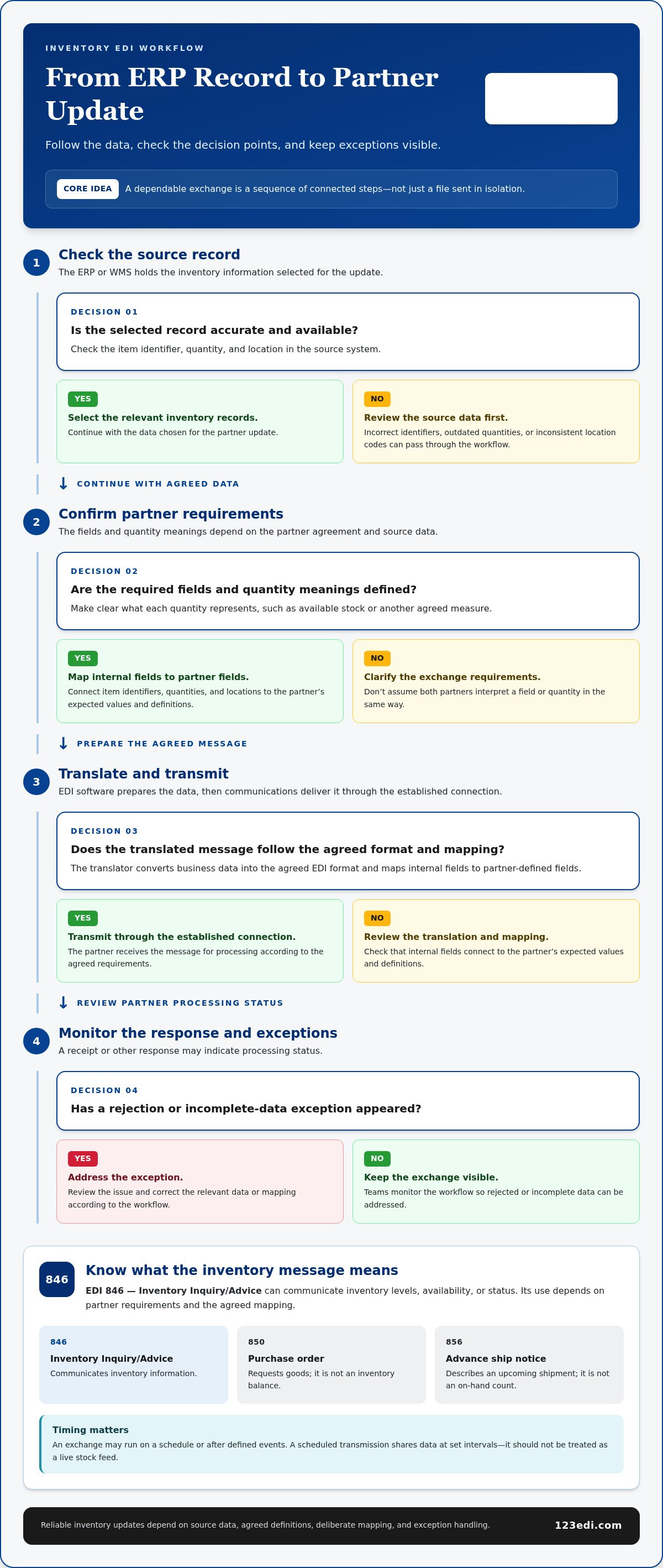
An automated inventory exchange is a sequence of connected steps, not just a file sent in isolation. Each system has a distinct role: the ERP or warehouse management system (WMS) holds the selected business data, EDI software prepares it for exchange, and the trading partner processes it according to the agreed requirements.
- Source record: The ERP or WMS records inventory information, such as an item’s quantity at a particular location.
- Message creation: The workflow selects the relevant records and creates an inventory message, such as an 846, based on the partner’s requirements.
- Translation: An EDI translator converts the business data into the agreed EDI format and maps internal fields to partner-defined fields.
- Transmission: EDI communications deliver the message through the established connection.
- Partner processing: The trading partner receives and interprets the message, then applies it to its own systems or process.
- Response and review: A receipt or other response may indicate processing status. Teams monitor exceptions and address rejected or incomplete data according to the workflow.
The exchange cadence depends on the workflow configuration, when accurate source data is available, and what the partner agreement specifies. A scheduled transmission shares data at set intervals; it shouldn’t be treated as a live stock feed. Standards help structure exchanges, while GS1 EDI global standards provide a framework for automating business transactions across the supply chain.
Where does EDI 846 fit into inventory communication?
The EDI 846, Inventory Inquiry/Advice, shares inventory information between trading partners, often to communicate availability or status. For suppliers working with large retailers, it is frequently the transaction used to report what stock a supplier can fulfill. Its exact use depends on the partner’s requirements and the fields included in the agreed mapping.
Consider how requirements may differ across partners. A retailer such as Walmart, Target, or Costco may have its own supplier guidelines covering transactions, formats, and testing, and Amazon vendor programs have their own document expectations. One supplier may therefore send inventory advice in different layouts, with different identifiers, to different partners. For retailer-specific detail, see our guides on EDI for Walmart suppliers, EDI for Target suppliers, and EDI for Amazon vendors.
The 846 isn’t a purchase order, and receiving one doesn’t mean a partner is seeing live inventory. The message reflects the selected data and the timing of the configured exchange.
How do ERP and warehouse systems contribute inventory data?
The ERP or WMS acts as the source for the records selected for an outbound update. Mapping connects internal item identifiers, quantities, and locations to the partner’s expected values and definitions. If systems use different codes or quantity meanings, translate them deliberately so the partner can interpret the message correctly. For more on connecting these systems, explore EDI integration with ERP systems and how it can support an inventory exchange workflow.
To automate inventory updates EDI dependably, plan the full path from the source record through partner processing and response. Cloud-based EDI, communications, and ERP integration can coordinate that exchange, while clear mappings and an exception-review process help manage the information being shared.
EDI inventory updates versus manual feeds: what should you compare?
The right exchange method depends on how often inventory data moves, what each trading partner accepts, and how much oversight the workflow requires. A spreadsheet may work for a one-off exchange, while recurring, structured updates can benefit from automation. EDI is a practical fit when partners support agreed transaction formats and processes, which is common among large retailers. The NIST analysis of EDI standards explains the structured standards that help business systems exchange data consistently.
| Method | Automation potential | Partner compatibility | Governance and exception visibility |
|---|---|---|---|
| Manual spreadsheet or feed | Low; people prepare and send updates | Flexible for occasional exchanges if the partner accepts the format | Relies on manual checks and follow-up; errors or delays may be harder to trace |
| Partner portal | Usually limited; entry may still be manual, though some portals support file uploads | Specific to the partner’s portal and requirements | Portal status can show submission results, while internal review remains important |
| API | Can support automated system-to-system exchange | Requires compatible API connections and agreed data structures | Needs defined ownership, access controls, monitoring, and exception handling |
| EDI (such as the 846) | Can automate recurring, structured transactions | Fits partners that support the relevant EDI standards and transaction requirements | Requires maintained mappings, communication monitoring, and a process for reviewing errors |
When is EDI a better fit than spreadsheets or portal entry?
Repeated exchanges with stable fields, such as item, quantity, and location, are strong candidates for EDI. The same agreed structure can be processed through a defined workflow each time. A one-off or low-volume exchange may not justify the same integration effort. Partner requirements matter, too: if a retailer such as Walmart, Target, Amazon, or Costco specifies an accepted transaction and format, that can determine whether a spreadsheet, portal, API, or EDI is appropriate. Some retailers may accept more than one method, while others require EDI for supplier onboarding.
Falling short of retailer requirements can carry consequences such as penalties or chargebacks, depending on the retailer’s program. Our guides on retailer EDI compliance and reducing retailer chargebacks explain how to approach those expectations.
Does EDI provide real-time inventory visibility?
EDI can automate updates, but the technology alone doesn’t make them real time. The partner’s view depends on how often messages are created, when they’re transmitted, and whether the source records are current and accurate. More frequent updates won’t correct stale source data. Acknowledgments can confirm receipt or processing status, but they don’t necessarily mean the partner’s inventory view has refreshed. To automate inventory updates EDI effectively, align the exchange schedule and monitoring process with the partner’s operational needs.
How do you implement and control automated inventory updates?
A dependable rollout starts with agreement on what information should move, where it comes from, and how both sides will handle exceptions. Treat implementation as a governed business workflow, not just a connection between systems.
- Confirm partner requirements: Identify the required message type (for example, the 846), exchange schedule, communication method, mandatory fields, and expected responses from each retailer or partner.
- Review source data: Check that the ERP or warehouse system holds accurate, consistently maintained inventory records.
- Define the mapping: Document how internal fields correspond to partner data, including item identifiers and cross-references, units of measure, locations, and the meaning of each quantity.
- Build and test the workflow: Validate message creation, translation, transmission, and responses before production use.
- Monitor and reconcile: Compare source records, outbound messages, acknowledgments, and partner-side results to identify gaps.
What should teams validate before going live?
Test routine updates as well as edge cases: a changed quantity, zero availability, a correction to a previously sent value, a rejected message, and a duplicate transmission. Test missing data and invalid values, too. Confirm the partner’s required formatting and item cross-references, then record who approves mappings and who investigates discrepancies. Clear ownership prevents issues from sitting unresolved between business and technical teams.
During testing, trace each sample from its original source record through the translated message and partner response. A successful transmission alone doesn’t prove that the partner interpreted the item, unit, location, and quantity as intended. Reconciliation helps verify the full exchange. Large retailers may also require their own testing or certification steps before production, so build that time into the plan.
How should teams monitor inventory EDI after launch?
Use available system logs to track message status, acknowledgments, exceptions, and delays. Define escalation steps for a failed message, an expected update that doesn’t arrive, or a quantity that doesn’t reconcile. A practical review identifies the affected items and partner, compares the source data with the message and response, and assigns an owner to investigate and correct the issue.
Keep the workflow current as partner specifications, item cross-references, and source-system data change. Periodic reviews can catch mapping drift before it becomes a recurring discrepancy. To automate inventory updates EDI with appropriate controls, include partner onboarding, integration, testing, and exception handling in the project scope from the start.
Learn about EDI integration requirements and the controls that support a reliable exchange.
How can cloud EDI and ERP integration support inventory automation?
Cloud-based EDI provides a way to exchange structured messages with trading partners, while ERP integration connects that exchange to the business records used to prepare inventory updates. The workflow depends on planning each part: partner requirements, data mapping, communications, testing, and exception handling all affect whether information can be exchanged and interpreted consistently.
For example, an ERP may hold item and quantity records, while the EDI workflow prepares the partner-required message and sends it through the agreed communication method. The project still needs clear rules for which source records to use, how often updates are sent, who reviews failures, and how discrepancies are reconciled. Cloud EDI and ERP integration connect the systems, while dependable results also rely on accurate source data and shared expectations.
What should an inventory EDI project define upfront?
Before implementation, document the business objective, trading partners, inventory fields to exchange, and update cadence. Identify the ERP or warehouse system that owns each field, who maintains item data, and how source records will be reconciled against outbound messages and partner responses. Also define test scenarios, communication responsibilities, and an exception process, including who investigates rejected messages or mismatched quantities.
This scope gives business and technical teams a shared reference point. It also separates integration work from operational decisions, such as what “available” means for a particular partner. A practical project plan should cover onboarding and mapping for each retailer or partner, rather than treating message transmission as the whole task. The EDI implementation project plan offers a phased structure you can adapt.
How can 123 EDI help businesses plan an EDI workflow?
123 EDI provides cloud-based EDI solutions and integration with existing ERP platforms. These capabilities support structured partner data exchange by connecting business records to EDI workflows and accounting for partner-specific requirements. Cloud-based EDI can also support the exchange of other business transactions as part of a wider integration plan.
To automate inventory updates EDI effectively, bring the business objective, source-data ownership, partner requirements, mapping, communications, testing, and ongoing exception handling into one plan. A well-defined workflow gives teams a clear basis for managing updates and resolving discrepancies as requirements change.
Explore 123 EDI’s EDI solutions to learn how cloud-based EDI and ERP integration can support connected business workflows.
Build a More Dependable Inventory Exchange
To automate inventory updates EDI successfully, focus on the full data flow, not just the message. Agree with each partner on which inventory details to share and how often, confirm whether retailers such as Walmart, Target, Amazon, or Costco expect the 846 or another transaction, map item and quantity data carefully, and test how the workflow handles corrections, rejected messages, and duplicates. EDI can reduce repetitive handling, but reliable updates still depend on accurate source records and a clear process for monitoring and reconciliation.
Cloud-based EDI and ERP integration can connect internal inventory data with structured partner exchanges. 123 EDI specializes in cloud-based EDI software and services and provides EDI integration with ERP systems, supporting businesses as they plan connected workflows around trading-partner requirements.
Ready to plan a more dependable inventory exchange? Explore 123 EDI solutions for connected business workflows.
Frequently Asked Questions
What is EDI 846 used for in inventory management?
EDI 846 communicates inventory inquiry or advice information between trading partners. Suppliers often use it to report item availability or inventory status to large retailers, based on the fields and process agreed with each partner. It isn’t a purchase order, and it doesn’t guarantee a live stock feed. The message content, timing, and business purpose depend on partner requirements and the data included in the mapped exchange.
Do large retailers like Walmart, Target, Amazon, and Costco require inventory reporting through EDI?
Requirements vary by retailer, program, and supplier relationship. Large retailers often specify the EDI transactions suppliers must support, and inventory reporting through the 846 may be among them. Amazon, Walmart, Target, and Costco each maintain their own guidelines. Confirm the current requirements, formats, and testing steps directly with the retailer before building your workflow.
Can EDI automatically update inventory levels in an ERP system?
Yes. An EDI workflow can pass inventory-related data into or out of an ERP system when the connection and business rules are configured for that purpose. For example, an integration may map a partner’s incoming data to ERP fields, or send selected ERP inventory records to a partner. EDI doesn’t independently decide which records to change. Mapping, validation, and controls determine how a transaction is processed and whether it updates a business record.
Does EDI provide real-time inventory updates?
Not inherently. EDI automates structured exchanges, but the partner’s view depends on when source data is updated, how often messages are created, and how quickly transmission and processing occur. A scheduled exchange may share inventory at set intervals rather than continuously. An acknowledgment can show that a message was received or processed, but it doesn’t necessarily mean the partner’s inventory display has refreshed. Define timing expectations with the trading partner.
How often should inventory updates be sent through EDI?
Set the update frequency according to partner requirements, operational needs, and how often the source inventory data changes. A retailer may specify a schedule, while a business may align updates with its warehouse or ERP processes. Before setting a cadence, clarify whether messages are sent at scheduled intervals or after defined events, and agree how delays or missed exchanges will be detected and handled.
What happens if an EDI inventory update is rejected?
A rejection indicates that the partner or receiving system couldn’t accept or process the message as submitted. Review the acknowledgment or available error details, then check required fields, item cross-references, quantity definitions, and formatting. Correct the underlying issue and resubmit according to the agreed procedure. Track the original message and correction so the team can reconcile the source record, outbound data, response, and final partner-side result without creating a duplicate update.
Which systems can connect to an EDI inventory workflow?
An inventory EDI workflow can connect an ERP or warehouse management system to EDI software and a trading partner’s systems. The ERP or warehouse system supplies selected inventory records, while EDI translation and communications prepare and deliver partner-formatted messages. The exact connections depend on the systems involved, available integration methods, and partner requirements. Clear mapping between internal and partner item, quantity, and location fields helps each side interpret the exchange.
Is EDI better than spreadsheets for sharing inventory with trading partners?
EDI is often a stronger fit for recurring, structured exchanges with partners that support the required transactions and formats. It can reduce repeated manual preparation and entry while providing a defined workflow for monitoring messages and responses. Spreadsheets may be practical for occasional or low-volume sharing if the partner accepts them. The best fit depends on exchange frequency, partner requirements, workflow complexity, and the controls needed to manage exceptions.