

A connection to SAP isn’t dependable just because a document reaches the system. With edi for sap integration, the full lifecycle matters: a partner sends a purchase order, the EDI layer translates and validates it, SAP processes it, and the response travels back. If mappings, acknowledgments, or exceptions aren’t handled clearly, a seemingly simple connection can leave teams chasing errors by hand.
Each trading partner may have distinct document requirements, while SAP workflows and internal capacity shape how much integration your team can manage. The right approach connects those pieces without making routine transactions harder to monitor or support. This guide explains how EDI documents move into and out of SAP, compares direct, middleware, and managed-cloud approaches, and outlines how to plan implementation around your workflows. It also covers mapping, testing, exception handling, and operational ownership, so you can make informed decisions and build a controlled path from partner connection to reliable day-to-day processing.
Key Takeaways
- Reliable EDI depends on how partner documents connect to SAP business workflows, not just on transferring files.
- Trace inbound and outbound documents through translation, validation, routing, and processing to clarify each handoff.
- Compare direct, middleware, and managed-cloud edi for sap integration by ownership, partner onboarding, monitoring, and change management.
- Reduce implementation risk by planning requirements, mappings, testing, rollout, and exception responsibilities before launch.
- Coordinate trading-partner connections and ongoing operations with EDI integration support suited to your SAP environment.
What EDI for SAP Integration Connects, and Why the Workflow Matters
EDI for SAP integration is the exchange and processing of structured business documents between SAP and trading partners, with each document connected to the relevant business workflow. It links partner communication to the work SAP supports, such as purchasing, sales, fulfillment, and finance. That distinction matters: transferring a file is only one step. The information must also be interpreted, routed, and used in the right business process.
Electronic Data Interchange standardizes how organizations exchange business documents. For a foundational overview of Electronic Data Interchange (EDI), consider how structured information passes between organizations without being rekeyed from one system into another. In an SAP environment, a well-defined workflow can reduce repetitive data entry, make transaction status easier to follow, and help coordinate order-to-cash activity across company boundaries.
Which SAP and trading-partner processes can EDI connect?
The scope depends on what trading partners exchange and how the business handles those transactions in SAP. A retailer might send a purchase order that leads to order processing, while a supplier sends an acknowledgment, invoice, or shipment update as the order progresses. Each document should support a business event, rather than exist as an isolated message.
Start by identifying the operational outcome you need, such as fewer manual handoffs, clearer order status, or a more coordinated path from order receipt to payment. Then define the technical work needed to support it: partner-specific document requirements, data mapping, validation, routing, and exception handling. Keeping these two views distinct helps teams discuss business priorities while staying focused on the implementation decisions needed to meet them.
Where does EDI fit in an SAP environment?
SAP ECC and SAP S/4HANA are ERP environments in which EDI can connect trading-partner data to relevant business processes. Their configurations and project requirements aren’t necessarily identical, so the integration design should reflect the specific SAP environment, workflows, and partner relationships in scope.
The integration layer bridges external document exchange and SAP processing. It coordinates how partner information reaches the appropriate workflow and how resulting business documents are prepared for exchange. That makes the design a question of process ownership as well as connectivity. Teams need clarity on where documents are handled, how exceptions become visible, and who resolves them. For a wider view of how EDI connects ERP environments and business systems, see this ERP integration guide.
Next, trace each document’s journey in both directions. Following the handoffs shows where partner requirements meet SAP processing and where a gap could interrupt the business workflow.
How EDI Documents Move Between Trading Partners and SAP
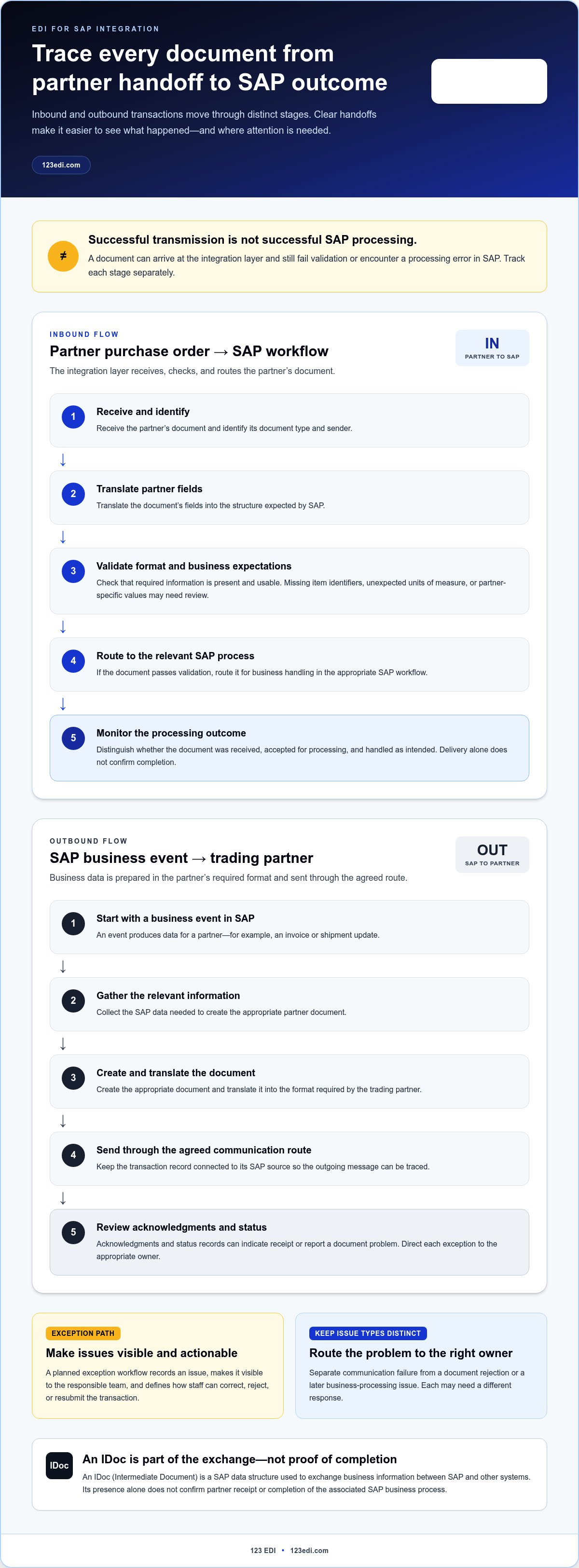
A dependable transaction has several handoffs, and each needs a clear outcome. A document is received from a partner or created from SAP business data, translated into the format required at the other end, checked, routed, and then processed or delivered. The exact configuration varies by SAP environment and partner, but the lifecycle should make it possible to trace what happened at each stage.
An IDoc, or Intermediate Document, is a SAP data structure used to exchange business information between SAP and other systems. It can carry transaction data through an integration workflow, but an IDoc’s presence alone doesn’t confirm that a partner received a document or that SAP completed the associated business process.
What happens to inbound EDI documents?
For an inbound purchase order, the EDI connection receives the partner’s document, identifies its type and sender, and translates its fields into the structure expected by SAP. Validation checks whether required information is present and usable. If the document passes, it’s routed to the relevant SAP process for business handling.
Validation should account for both format and business expectations. A missing item identifier, an unexpected unit of measure, or a partner-specific value may require review rather than automatic processing. A planned exception workflow records the issue, makes it visible to the responsible team, and gives staff a defined way to correct, reject, or resubmit the transaction.
Successful transmission isn’t the same as successful SAP processing. A file can arrive at the integration layer and still fail validation or encounter a processing error in SAP. Monitoring should distinguish these stages so operations teams can tell whether a document was received, accepted for processing, and handled as intended. Delivery alone isn’t completion.
How does SAP send outbound EDI documents?
Outbound flow starts when a business event in SAP produces data for a partner, such as an invoice or shipment update. The integration process gathers the relevant information, creates the appropriate document, translates it into the partner’s required format, and sends it through the agreed communication route. The transaction record should connect that outgoing message to its SAP source.
After delivery, acknowledgments and status records help teams understand what happened next. Depending on the transaction and partner process, an acknowledgment may indicate receipt or report a problem with the document. Teams should distinguish a communication failure from a rejection or a later business-processing issue, then direct each exception to the right owner.
Clear monitoring supports practical questions: Which partner document is affected? Where did processing stop? Is action needed from the EDI team, SAP operations, or the business owner? Defining those responsibilities before go-live reduces uncertainty when a transaction needs attention. For more background on document exchanges and transaction patterns, the EDI transaction guide provides useful context.
For organizations aligning partner exchanges with ERP workflows, cloud-based EDI integration support can help coordinate document flows and ongoing transaction operations.
Compare SAP EDI Integration Approaches: Direct, Middleware, or Managed Cloud
There’s no single architecture that suits every SAP environment. A narrow connection for a small, stable partner group has different operating demands from a program with varied document requirements and frequent partner changes. To compare options for edi for sap integration, look beyond where the software runs. Consider who owns partner onboarding, map updates, monitoring, exception handling, and changes to SAP processes.
| Consideration | Direct connection | Middleware | Managed cloud EDI |
|---|---|---|---|
| Ownership | Internal team manages the connection and related processes. | Internal team operates the integration platform and its workflows. | Responsibilities are shared with an EDI service partner according to the operating model. |
| Partner onboarding | Team handles each partner connection within its established approach. | Team configures partner connections through the intermediary. | Partner coordination is supported through the managed EDI relationship. |
| Mapping operations | Internal team maintains document mappings. | Team manages mappings within the platform. | Mapping responsibilities are coordinated with the service partner. |
| Monitoring | Team monitors connection and transaction status. | Team uses platform workflows to monitor transactions. | Monitoring responsibilities are defined between the business and service partner. |
| Change management | Internal owners assess and implement changes. | Team manages platform and integration changes. | Business and service partner coordinate changes and operational handoffs. |
When might direct SAP connectivity fit?
A direct approach may suit a narrow, controlled integration that aligns closely with existing SAP processes and internal expertise. It can keep ownership near the SAP team, but the team also needs a plan for partner setup, mapping maintenance, monitoring, and updates as requirements evolve. Direct connectivity isn’t automatically simpler. Its fit depends on the scope and the capacity to operate it over time.
When might middleware or managed cloud EDI fit?
Middleware places an integration layer between SAP and trading partners, giving teams a place to coordinate communication, translation, and transaction monitoring. The organization still operates the platform and related workflows. With managed cloud EDI, a service partner supports the EDI operating relationship, while the business retains responsibility for its SAP processes and decisions. Neither model removes the need to assign clear owners or plan for exceptions. A broader view of deployment considerations is available in this cloud-based EDI guide.
Choose by assessing partner count, document and mapping complexity, the SAP landscape, and internal operating capacity. Ask who responds when a partner changes a requirement, a map needs revision, or a transaction requires investigation. Those answers reveal whether direct ownership, an internally operated platform, or a managed relationship best fits how your business works.
123 EDI’s cloud-based EDI integration services can support coordination between trading-partner connections and ERP workflows, including ongoing transaction operations.
Reduce SAP EDI Integration Risk with a Staged Implementation Plan
Risk falls when responsibilities and exceptions are planned before launch, not after a transaction fails. For edi for sap integration, a staged plan gives business, SAP, and EDI teams a shared view of what each partner sends, what SAP must do with it, and who acts when a step doesn’t work as expected.
What should teams define before configuration?
Begin with discovery. Inventory trading partners, document flows, relevant SAP processes, and the business owners behind them. Then capture each partner’s requirements alongside internal rules: required fields, validation expectations, acknowledgments, and known exceptions. This groundwork helps prevent a map from being treated as complete when it reflects only the document format, not the business process it needs to support.
Assign operational ownership as well. Identify who monitors transactions, investigates errors, approves mapping changes, and escalates unresolved issues across business, SAP, and EDI operations. A clear owner and escalation path turn exceptions into managed work rather than an unclear handoff.
How should testing and rollout protect business continuity?
Move through implementation in deliberate stages, with an agreed output and owner at each step:
- Discovery: Document partners, transaction flows, current processes, and business priorities.
- Requirements: Confirm document rules, data fields, acknowledgment expectations, and exception paths.
- Mapping: Define how partner data corresponds to the information SAP processes, including partner-specific variations.
- Configuration: Set up the required communication, translation, routing, and SAP handoffs for the agreed scope.
- Testing: Verify expected transactions and failure scenarios from partner exchange through SAP processing and response.
- Rollout: Onboard partners in a controlled sequence against agreed acceptance criteria, with owners ready to monitor results.
- Ongoing review: Revisit mappings, partner requirements, workflow changes, and exception trends as operations evolve.
Testing should include representative inbound and outbound documents, as well as incomplete or invalid data, rejected transactions, and recovery after correction. Confirm not only that messages move, but that the relevant SAP process handles them as intended and that teams can identify transaction status. Record acceptance criteria before testing begins so business and technical owners share a clear definition of readiness.
Realistic end-to-end testing matters because a document that passes through every technical handoff can still fail to support the intended business process.
After launch, maintain monitoring and a review cadence so partner changes or SAP workflow updates prompt timely assessment. SAP EDI integration implementation planning should account for partner workflows, testing, and operational ownership.
Connect SAP EDI Workflows with 123 EDI
A sound architecture is only part of dependable EDI operations. Partner requirements evolve, transaction exceptions need attention, and business teams need clear ownership of the information moving between trading partners and SAP. 123 EDI provides cloud-based EDI, EDI software, an EDI portal, communications, AS2, and ERP integration services to support this broader workflow. The focus is on connecting partner exchanges with the business processes they support.
What does a practical 123 EDI engagement support?
Planning starts with how your organization works: which partners exchange documents, which SAP processes depend on them, and how teams manage transaction activity. Business stakeholders can clarify document meaning and process expectations, SAP teams can define the relevant ERP handoffs, and EDI operations can address partner communication, mappings, and day-to-day transaction oversight. This collaboration keeps the integration grounded in operational needs rather than treating connectivity as an isolated technical task.
Cloud-based EDI and portal options support coordinated partner operations by giving organizations a structured way to manage EDI activity and partner interactions. The role of each depends on your architecture, partner workflows, and internal operating model. 123 EDI also provides AS2 as part of its EDI communications offering. The goal is to align the approach with your SAP environment and transaction scope, rather than assume every business needs the same configuration.
For edi for sap integration, ongoing operations deserve attention alongside implementation. Teams should know how transaction issues are surfaced, who investigates them, and how partner or workflow changes are reviewed. 123 EDI’s EDI integration services support coordination around partner connections and ERP workflows, while business and SAP owners retain clarity over their processes and decisions.
What should the reader do next?
Before discussing architecture, prepare a concise picture of the work the integration needs to support. Include:
- The SAP processes involved and the business owners responsible for them.
- The trading partners in scope and their document requirements.
- Inbound and outbound document flows, including expected acknowledgments.
- Known validation rules, exceptions, and escalation owners.
- Operational goals, such as reducing rekeying or improving transaction visibility.
This outline gives business, SAP, and EDI stakeholders a shared starting point. It also helps shape a practical scope for integration planning, testing, rollout, and continued operations. You don’t need every technical decision settled before beginning. A clear view of workflows, partners, and ownership makes the next decisions easier to organize.
With your processes and partner requirements in view, discuss your SAP EDI integration with 123 EDI. A thoughtful plan can bring clarity to the connections behind your everyday transactions.
Build an Integration That Can Evolve With Your Business
Your SAP environment and partner network will continue to change. Treat edi for sap integration as an operating capability, not a one-time connection: keep ownership visible, revisit transaction needs as workflows evolve, and make room for new partner requirements. That perspective helps teams carry a clear implementation plan into daily operations.
123 EDI supports cloud-based EDI and ERP integration, with EDI software, portals, communications, and AS2 available to support partner workflows. Bring your SAP and business stakeholders together around the transactions that matter, the partners involved, and the operating model you want to sustain.
Discuss your SAP EDI integration with 123 EDI and begin shaping an approach around your business workflows. With clear priorities and shared ownership, your team can move forward with confidence.
Frequently Asked Questions
Can EDI integrate with SAP S/4HANA?
Yes, SAP S/4HANA can participate in EDI workflows when an integration design connects its business data with trading-partner documents. The details depend on the organization’s SAP landscape and project requirements. For example, a team planning to exchange purchase orders should identify the SAP process involved, the partner’s document expectations, and how data will be handled across systems. Validate the technical design for your environment rather than assuming another S/4HANA setup will work the same way.
Does SAP include EDI functionality?
SAP can support the business processes and data involved in EDI, but complete partner document exchange also requires an integration workflow. That workflow addresses communication, translation, routing, and transaction visibility around SAP processing. For instance, a sales order process may rely on partner documents being prepared and delivered in the expected format, with transaction status available to the responsible team. Define how those surrounding tasks will be handled as part of the project design.
Is SAP EDI integration different from SAP IDoc integration?
Yes. EDI refers to structured business-document exchange between organizations, while an IDoc is an SAP data format that can carry information within business processes and integrations. An EDI workflow may use IDocs to exchange data with SAP, but an IDoc alone doesn’t describe the full partner exchange, its communication, or partner-specific document rules. Teams should confirm how IDocs fit the processes in their SAP environment and how they connect to the wider EDI flow.
Can EDI connect SAP with multiple trading partners?
Yes, an EDI design can support multiple trading partners, each with its own document expectations and business rules. A supplier might exchange invoices with one partner and receive purchase orders from another, for example. Plan for partner-specific onboarding and changes rather than treating one connection as a universal template. As the partner network grows, maintain clear ownership for mapping updates, transaction monitoring, and exceptions so teams can identify which partner and document a problem affects.
Does integrating EDI with SAP require replacing an existing ERP system?
No, EDI integration is generally designed to connect document exchange with existing enterprise workflows, not replace the ERP. Before configuration, document which systems remain in place, where each document is processed, and what information must pass between them. For example, a company may keep its current SAP environment while adding a defined route for partner purchase orders. The project scope should make system roles and data handoffs explicit.
How can teams manage EDI errors in SAP workflows?
Teams can manage errors by defining validation rules, monitoring ownership, escalation paths, and recovery procedures before transactions go live. Classify issues by where they occur: a communication problem, a document rejected during processing, or a business-level discrepancy such as an unexpected quantity. Test each type with the people responsible for resolving it. Recording the cause, action taken, and transaction outcome helps teams handle recurring issues consistently.