

What if an EDI provider’s SOC 2 report covers only part of the service that moves your trading-partner data? SOC 2 compliance for EDI providers can be difficult to assess when report types, service boundaries, and security responsibilities aren’t clear. A report can provide useful evidence, but its relevance depends on the systems and controls it actually covers.
A provider’s report can make security due diligence easier, but SOC 2 is an attestation report, not a certification. Type I and Type II reports also examine different things. Neither removes the need to understand how responsibilities are shared among your EDI provider, your business, and other service organizations.
This guide explains how to interpret SOC 2 evidence, compare reports using practical criteria, and connect report scope to your EDI data flows. You’ll learn what a report can and can’t demonstrate, how to assess its relevance to cloud EDI, communications, and ERP integration, and how to map responsibilities across your trading-partner workflows.
Key Takeaways
- Assess SOC 2 compliance for EDI providers by examining report scope and evidence, not relying on a security label alone.
- Distinguish Type I control design from Type II operating effectiveness, and check report dates and examination periods.
- Trace whether the report covers the EDI service, systems, and organizational boundaries that handle your data.
- Map responsibilities for transaction data, access, transmission, and incident response across your provider, business, and other service organizations.
- Use your cloud EDI, portal, AS2, and ERP workflows to define which evidence and operational fit matter most.
Why SOC 2 matters when evaluating an EDI provider
Purchase orders, invoices, shipment notices, and partner communications carry information your business relies on to keep transactions moving. If those exchanges pass through an EDI provider, you need to understand how the provider manages the systems and processes involved. A report can support that review, but its title alone won’t tell you whether it covers the services your workflows depend on.
“A SOC 2 report is an independent CPA examination of controls within a defined scope, not a blanket security certification.” SOC 2 is an attestation report, not a certification awarded to an organization as a whole. It describes what was examined and the related findings. It doesn’t declare that every part of a provider’s business or service is secure.
When assessing SOC 2 compliance for EDI providers, ask whether the evidence applies to the service handling your data. Review the systems and organizational boundaries covered, the controls examined, and any qualifications or exceptions. This is more useful for due diligence than relying on a “SOC 2” label or assuming the report eliminates risk.
What does SOC 2 tell an EDI customer?
A SOC 2 report addresses controls within its stated examination scope. The AICPA Trust Services Criteria provide the framework, with categories covering Security, Availability, Processing Integrity, Confidentiality, and Privacy. A report may include one or more categories, so don’t assume that it covers them all. Instead, consider which categories relate to the service and information your workflows depend on.
The report is evidence to evaluate, not a guarantee of zero risk. It can help you understand the controls examined and the auditor’s findings, but it doesn’t replace your assessment of business needs, data flows, and shared responsibilities. Start by connecting the report’s boundaries to the EDI components you use.
Why EDI service scope matters
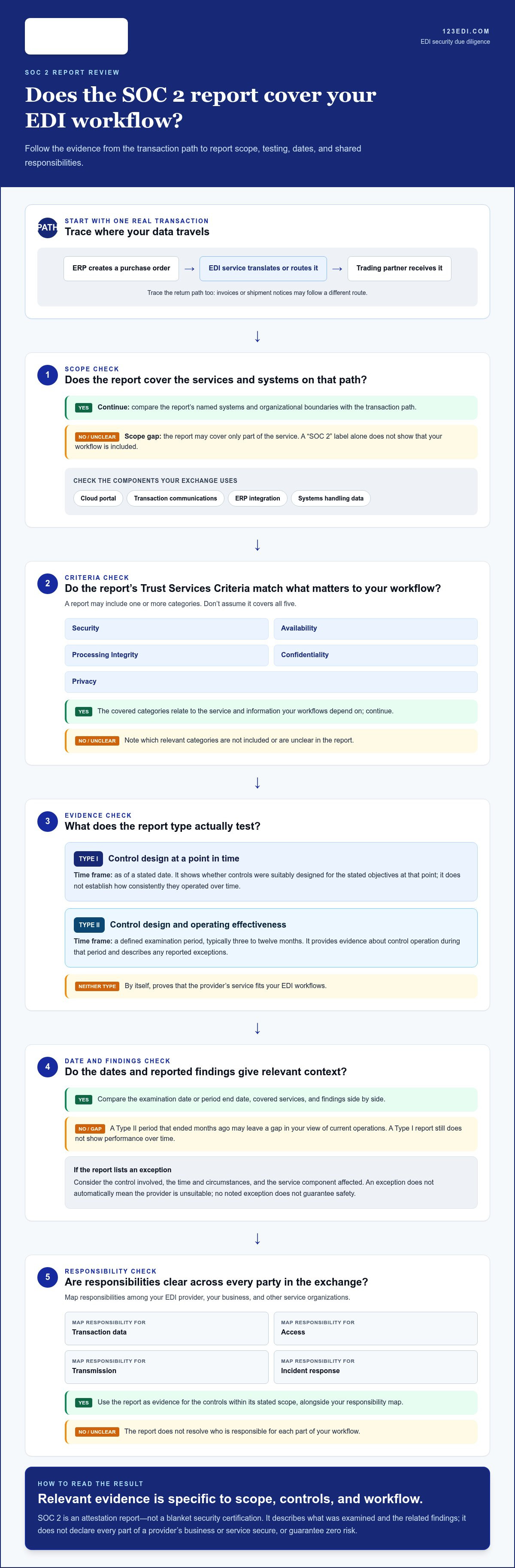
An EDI relationship can involve several components, such as a cloud portal, transaction communications, and integration with business systems. A report covering one service or system may not describe every component involved in an exchange. Trace a typical transaction: an ERP system produces a purchase order, the EDI service translates or routes it, and a trading partner receives it. In the other direction, invoices or shipment notices may follow a different path.
Map those steps before judging whether the report fits. Identify where data is created, handled, transmitted, and received, then compare that path with the systems named in the report. This workflow-first approach also helps when assessing cloud-based EDI solutions, because the service design shapes where information moves and which parties participate. A clear scope review makes SOC 2 evidence more relevant to your operating model.
SOC 2 Type I vs. Type II: understand the evidence
After confirming what a report covers, check how the examination tested the controls. Type I and Type II reports answer different questions: Type I focuses on control design at a specific date, while Type II examines whether controls operated over a defined period. Neither report type, by itself, proves that the provider’s service fits your EDI workflows.
This distinction matters when comparing SOC 2 compliance for EDI providers. The report date and examination period show how far its evidence reaches, but not whether it includes the cloud platform, communications, or integrations your transactions rely on. Consider the report type and dates alongside service scope and your operating requirements.
| Report type | Focus | Time frame | Buyer interpretation |
|---|---|---|---|
| Type I | Design of controls | As of a stated date | Shows whether controls were suitably designed for the stated objectives at that point; it doesn’t establish how consistently they operated over time. |
| Type II | Design and operating effectiveness | Defined examination period, typically three to twelve months | Provides evidence about control operation during the period, including any reported exceptions; it still requires scope and risk context. |
What a Type I report assesses
A Type I report evaluates whether controls were suitably designed, as of the examination date, to address the stated criteria. You can use it to understand the described control framework and consider whether its design is relevant to the service under review. It doesn’t test whether controls worked consistently across daily transactions or changing operating conditions. Check the service scope and report date, then consider what may have changed since the examination.
What a Type II report adds
A Type II report examines control design and operating effectiveness across a defined period. The auditor tests evidence from that period, and the report describes any exceptions identified. Read each exception in context: consider the control involved, the time and circumstances, and the service component affected. An exception doesn’t automatically mean the provider is unsuitable, just as a report without a noted exception doesn’t guarantee safety.
For a fair comparison, align the reports before drawing conclusions. A Type II period that ended months ago may leave a gap in your view of current operations, while a recent Type I report still doesn’t show performance over time. Compare examination dates, period end dates, covered services, and findings side by side. Then consider how each difference relates to your transaction volume, partner requirements, and tolerance for disruption.
The AICPA Trust Services Criteria provide useful background for understanding the criteria referenced in a report. To put the evidence in the context of your operating model, explore EDI and ERP integration options alongside your workflow needs.
How to assess whether an SOC 2 report covers the EDI service
“An SOC 2 report is relevant only when its stated scope matches the EDI service and data flows you’re assessing.” Use a consistent review sequence to connect the report’s descriptions to the way your organization exchanges transactions with trading partners. This turns SOC 2 compliance for EDI providers from a label into a practical scope check.
- Identify the service in use. Name the EDI portal, communications, translation, or integration components involved in your workflow. Include the ERP connection and any separate services your transactions depend on.
- Find the report’s system description. Look for the service name, systems, locations or teams described, and organizational boundaries. Compare these details with the components you identified rather than assuming a broad company description covers every service.
- Trace a transaction through the system. Map how an order, invoice, or shipment notice moves from your ERP through the EDI service to a trading partner, and how responses return. Compare each point where data is handled or transmitted with the report’s description.
- Review exclusions and dependencies. Note services or systems outside the examination boundary, along with dependencies on other service organizations. Determine whether those components are addressed in the report or need separate consideration.
- Read exceptions and customer controls. Review each reported exception, the control it concerns, and whether it relates to your service path. Identify complementary user-entity controls, meaning controls the report expects your organization to operate, and clarify ownership internally.
- Document open questions and follow-up. Record any mismatch between your workflow and the report, then seek clarification through your due-diligence process. Tie each question to a specific system, transaction step, or responsibility.
Check system boundaries and service components
EDI arrangements can combine a cloud portal, transaction communications such as AS2, and integration with an ERP system. These components may have different boundaries or dependencies. Compare the report’s system description with your deployment and partner workflows. For example, a portal may be in scope while a separate integration component or external dependency is treated differently. The goal is to identify precisely which parts of the transaction path the report addresses.
Interpret exceptions and complementary controls
Exceptions need context, not a quick pass-or-fail judgment. Consider the control affected, the circumstances described, and whether the finding could affect your data or transaction process. Also distinguish provider controls from complementary user-entity controls. The report may, for example, assign your organization responsibility for a control that supports the service. Confirm that the relevant team understands and performs it.
Check how the report treats subservice organizations, too. They may be included in the examination or handled through a carve-out, which leaves their controls outside the report’s scope. A carve-out doesn’t automatically make the report unsuitable, but it signals a dependency to assess separately. Mapping covered components, exclusions, exceptions, and customer responsibilities gives your team a grounded view of how the evidence aligns with its EDI operations.
Build practical SOC 2 due diligence around EDI workflows
A report becomes more useful when you connect it to the way transactions move through your organization. For SOC 2 compliance for EDI providers, map each stage of the workflow and record who owns the related decisions. This helps distinguish controls described by the provider from responsibilities that remain with your business, trading partners, or other service organizations.
Map data flows and shared responsibilities
Follow a transaction from creation in your ERP through translation and transmission, then trace receipt and downstream processing. Include communications such as AS2, but assess them as one part of the broader workflow alongside access, configurations, data handling, and incident responsibilities. Integration design can shift responsibility boundaries, so assign an owner to each step instead of assuming the provider manages the entire path.
- Transaction data: Identify where orders, invoices, and shipment notices originate, are transformed, and are received.
- Access and configuration: Record who manages user access, connection settings, and business-side approvals.
- Transmission: Note how data moves between your systems, the EDI service, and trading partners, including AS2 where used.
- Incidents: Clarify who reports, investigates, and coordinates a response when an issue affects a transaction or data exchange.
- Dependencies: Track other systems or organizations involved in the workflow and how their responsibilities are addressed.
For example, the provider may operate an EDI service while your team remains responsible for ERP access and approving business transactions. A different integration design may place more configuration work with your organization. Treat the map as a shared-responsibility record, then compare it with the report’s described controls and customer responsibilities. Reviewing EDI-to-ERP integration options can help you identify which system handoffs matter in your workflow.
Turn report findings into procurement decisions
Summarize the evidence in a short decision record: the service and systems covered, the report period, relevant exceptions, excluded dependencies, and customer controls. For each finding, note which transaction step it could affect and who owns the follow-up. This makes the review easier to share across security, procurement, integration, and business teams without reducing the report to a pass-or-fail label.
Compare open issues with your organization’s risk tolerance and trading-partner commitments. A gap affecting a critical order flow may call for a different response from one unrelated to the service you use. Record unresolved questions for internal security and procurement review, assign an owner, and document whether you’ll proceed, add safeguards, or revisit the assessment as the workflow changes.
A clear view of your EDI communications and system connections makes due diligence more specific. Explore EDI communications and integration solutions to connect your workflow requirements with the service components you’re evaluating.
Choose an EDI partner with evidence that fits your operating model
A sound decision brings operational needs and assurance evidence together. Start with the workflows your trading partners rely on, then assess the service components and responsibilities that support them. SOC 2 compliance for EDI providers is one part of that review. The goal is to understand whether the evidence and service design fit your business, not to treat a report type as a substitute for operational alignment.
- Define the workflow. List trading partners, transaction types, expected volumes, and the systems involved, including where ERP data enters or leaves the process.
- Inspect the evidence. Compare report scope, examination period, findings, and dependencies with the services your transactions will use.
- Map responsibilities. Identify who manages access, configurations, approvals, communications, and incident coordination at each handoff.
- Assess operating fit. Consider whether the service model supports your required transaction flows and leaves responsibilities clear for your teams.
Match EDI service design to business needs
Trading-partner volume and transaction patterns can shape the service components your organization needs. A business using a portal for document exchange may have different operational requirements from one connecting EDI directly with an ERP system. Consider how cloud EDI, communications such as AS2, and ERP integration fit your processes, and decide which operational tasks your team wants to retain. An EDI integration with ERP guide can also help you frame the system handoffs to evaluate.
Keep the evidence review connected to the service design. Consider a report’s scope alongside the services involved, while separately identifying your own controls and business approvals. This joined-up view helps procurement, security, and operations evaluate the same workflow instead of making decisions from disconnected documents.
Take the next step with 123 EDI
123 EDI provides cloud-based EDI, EDI software and portals, communications including AS2, and integration with ERP systems. Its services support secure electronic data exchange between trading partners and can connect EDI systems directly with ERP platforms to automate business workflows and communications. Your SOC 2 review remains a distinct due-diligence activity, focused on the evidence relevant to the service and workflow under consideration.
With your transaction flows and responsibilities mapped, you can have a more focused conversation about the EDI setup that supports your operating model. Explore 123 EDI solutions and discuss your workflow needs.
Put your EDI due diligence into action
Use your SOC 2 compliance for EDI providers review as a starting point for informed, ongoing decisions. As trading-partner requirements and business processes change, revisit whether your documented expectations still match the way information moves and who is responsible at each handoff. Keeping the review active helps security, procurement, and operations work from a shared understanding rather than treating due diligence as a one-time document check.
With your priorities clear, consider an EDI approach that supports your workflows and integration needs. 123 EDI offers cloud-based EDI solutions, portals, communications, AS2, and EDI integration with ERP systems. Its specialized B2B data integration services can provide a starting point for discussing how your partner exchanges fit your operating model.
Explore 123 EDI’s cloud-based EDI solutions and take the next step toward a more connected EDI workflow.
Frequently Asked Questions
Is SOC 2 a certification for EDI providers?
No, SOC 2 is not a universal certification badge for EDI providers. It’s an independent examination that results in a report about controls within a defined scope. When evaluating SOC 2 compliance for EDI providers, read the named service, examination period, and findings rather than treating a logo or report title as proof of broad coverage. Use those details to determine what additional due diligence your workflow requires.
What is the difference between SOC 2 Type I and Type II?
Type I assesses whether controls were suitably designed as of a stated date. Type II examines control design and operation over a defined period, giving buyers evidence about performance during that interval. A Type I report, for example, won’t show how a control functioned across routine transaction processing over time. In either case, compare the report dates and covered systems with the EDI services your organization plans to use.
Does SOC 2 guarantee that an EDI provider is secure?
No. A SOC 2 report offers evidence about specified controls within its examination scope, but it can’t guarantee that incidents or risks will never occur. Look for exclusions, exceptions, and dependencies that could affect your transaction path. Also identify responsibilities assigned to your organization, such as managing ERP access or approving transactions, so you don’t mistake them for provider-managed controls.
What should an SOC 2 report cover for an EDI provider?
Look for the services and systems that handle your transactions, which may include cloud EDI, a portal, communications, or integration components. Compare the report description with a real workflow, such as an order moving from your ERP through EDI to a trading partner. SOC 2 compliance for EDI providers doesn’t mean every report covers every component, so note any gaps or separate systems that support the exchange.
Can a SOC 2 report cover an EDI provider’s subcontractors or cloud services?
That depends on the report’s boundaries and how it treats service dependencies. Some subservice organizations may be included in the examination; others may be handled through a carve-out, leaving their controls outside the report’s scope. Review how relevant cloud services or other dependencies are described, then identify which responsibilities remain with the EDI provider and which sit with your organization. Don’t assume a particular arrangement without reviewing the report.
How often should a business review an EDI provider’s SOC 2 report?
Review the report during provider assessment and revisit it according to your organization’s vendor-risk process. The right cadence depends on internal policy, the service’s risk to your operations, and whether the arrangement changes. Check the report’s period and date, then reassess if a new integration, trading-partner workflow, or responsibility changes how data moves. A scheduled review can help keep due-diligence records aligned with current operations.
What does a SOC 2 report exception mean for an EDI customer?
An exception describes a control test result or other matter reported for the examination. Its significance depends on the control involved, the period and systems affected, and any remediation or compensating measures described. Consider whether it relates to the service handling your transactions or to a different area. An exception isn’t automatically a critical failure; document its relevance and route unresolved concerns to your review team.