

What if the safest EDI migration isn’t one big cutover, but a series of controlled, partner-by-partner transitions? If you’re concerned that an order, invoice, or shipment notice could fail during the switch, that caution is well placed. Avoiding disruption during EDI migration starts with understanding how transactions move today, testing the new workflows thoroughly, and coordinating each transition with the teams and trading partners that rely on them.
This practical 2026 guide shows how to plan a migration that protects transaction processing and trading-partner relationships while keeping business operations moving. You’ll learn how to map dependencies, validate EDI maps and ERP integrations before production, and set monitoring and approval steps for each cutover. A phased approach can also help you identify problems before they affect more workflows.
We’ll cover how to coordinate internal teams and trading partners, what to monitor during a transition, and how cloud-based EDI and ERP integration can support a governed migration. A clear plan, defined owners, and integration support help your team manage the change with less operational strain.
Key Takeaways
- Define migration risk in business terms, including delayed, duplicated, rejected, or misrouted transactions across order, fulfillment, and invoicing workflows.
- Give each migration phase a clear owner, required inputs, validation evidence, and approval gate so teams know when it’s ready to proceed.
- Choose between big-bang, partner-by-partner, and parallel migration based on transaction criticality, partner count, integration complexity, and testing capacity.
- Use a transaction-level checklist to verify data completeness, map accuracy, acknowledgments, ERP posting, and live processing before stabilization.
- Avoiding disruption during EDI migration is easier when cloud EDI, partner communications, and ERP integration are coordinated around business requirements.
Why avoiding disruption during EDI migration starts with mapping business dependencies
EDI changes can affect far more than a connection or software setting. A change to an order flow may affect fulfillment. An invoice mapping issue can delay reconciliation. A communication failure can leave a trading partner without the information needed to proceed. To focus on avoiding disruption during EDI migration, first identify the business activities that depend on each transaction, then trace how information moves between systems and partners.
EDI migration disruption is a delayed, duplicated, rejected, or misrouted transaction, such as a purchase order that never reaches the ERP or an invoice that a partner can’t process. Defining risk this way helps teams assess the operational impact instead of relying on a general migration label. Continuity depends on the scope of the change, the dependencies involved, the evidence gathered through validation, and the discipline of the cutover.
Start with a transaction map. For each document, record the trading partner, the system that creates it, every step that transforms or validates it, how it’s transmitted, where it’s received, and how the result is reconciled. Include processing windows and escalation owners. A transaction that arrives after a fulfillment cutoff may have a different business impact from one that can wait until the next scheduled run.
Which EDI workflows need continuity protection?
Trace purchase orders, invoices, and advance ship notices where applicable, following each from origin to business outcome. Note ERP touchpoints and any other applications involved in creating, transforming, transmitting, receiving, or reconciling the document. Partner requirements matter too: document formats, acknowledgment expectations, and processing schedules can make similar workflows behave differently. Foundational context on Electronic Data Interchange (EDI) can help teams understand the standards-based exchange behind these flows.
Build a migration baseline before changing systems
Record how the current environment performs before configuration changes begin. A practical baseline should include:
- Transaction types, partner connections, volumes, and processing schedules.
- Known exceptions, recurring errors, manual workarounds, and unresolved issues.
- Business owners in operations, IT, finance, and supply chain, with a clear contact for each workflow.
- Critical processing windows and the business impact if an exchange fails or arrives late.
This record gives teams a point of comparison during testing and stabilization. It also shows where EDI and ERP behavior must align, from document handoffs to posting and reconciliation. For more on those connections, see the EDI integration with ERP guide. With dependencies, owners, and current issues visible, teams can prioritize validation around real operating needs rather than treating every transaction as equally critical.
How to structure an EDI migration in controlled, testable phases
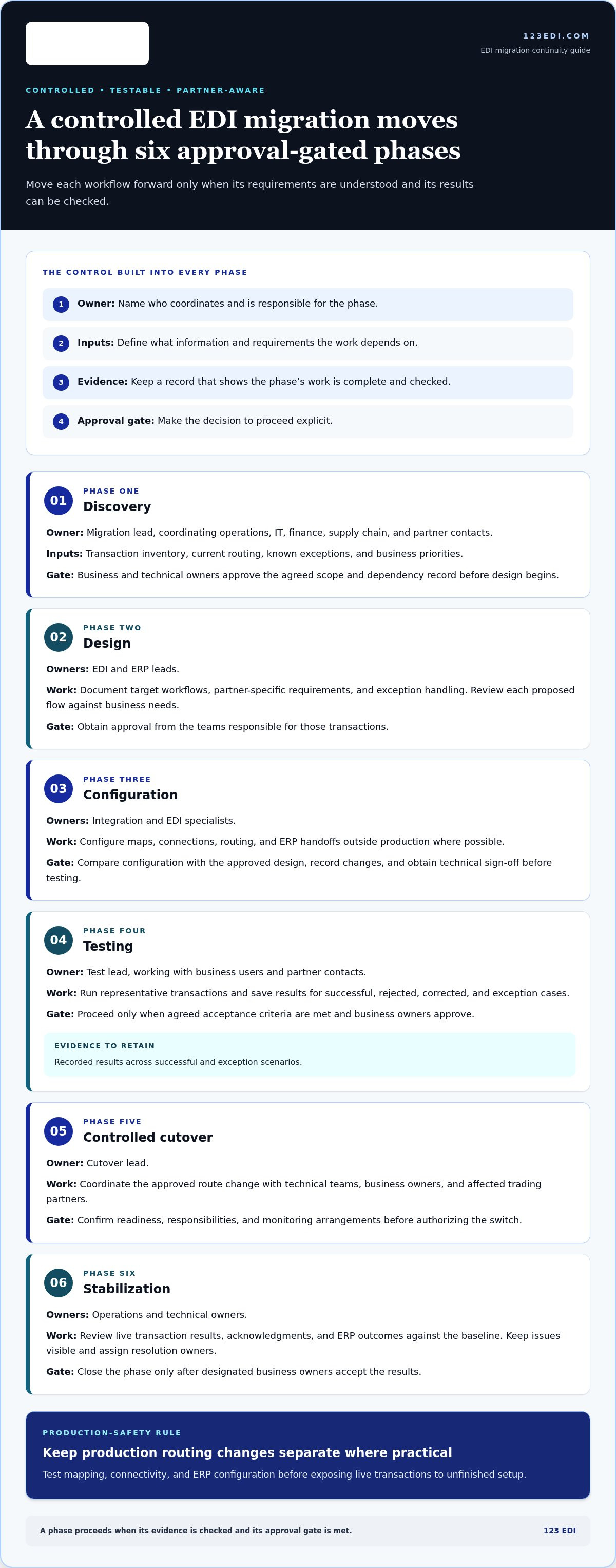
A controlled migration moves each workflow forward only when its requirements are understood and its results can be checked. Give every phase an owner, defined inputs, evidence of completion, and a clear approval gate. Where practical, keep production routing changes separate from mapping, connectivity, and ERP configuration work. This separation lets teams test changes without exposing live transactions to unfinished setup.
- Discovery: The migration lead coordinates operations, IT, finance, supply chain, and partner contacts. Inputs include the transaction inventory, current routing, known exceptions, and business priorities. The evidence is an agreed scope and dependency record, approved by business and technical owners before design begins.
- Design: EDI and ERP leads document target workflows, partner-specific requirements, and exception handling. Review each proposed flow against business needs, then obtain approval from the teams responsible for those transactions.
- Configuration: Integration and EDI specialists configure maps, connections, routing, and ERP handoffs outside production where possible. Compare the configuration with the approved design, record changes, and require technical sign-off before testing.
- Testing: The test lead works with business users and partner contacts to run representative transactions. Save results for successful, rejected, corrected, and exception cases. Proceed only when agreed acceptance criteria are met and business owners approve.
- Controlled cutover: The cutover lead coordinates the approved route change with technical teams, business owners, and affected trading partners. Confirm readiness, responsibilities, and monitoring arrangements before authorizing the switch.
- Stabilization: Operations and technical owners review live transaction results, acknowledgments, and ERP outcomes against the baseline. Keep issues visible, assign resolution owners, and close the phase only after designated business owners accept the results.
What should happen before production cutover?
Confirm partner connectivity, document mappings, routing rules, and ERP handoffs in a test environment before changing live routes. Use realistic scenarios, including valid, rejected, corrected, and exception transactions, to catch failures that a simple “happy path” test can miss. Write acceptance criteria in advance, identify who reviews each result, and secure business-owner approval. A test pass should demonstrate the expected business outcome, not just successful transmission.
How does a controlled cutover protect transaction flow?
Sequence transitions around partner readiness, workflow criticality, and the team’s capacity to monitor and respond. Before the change, document the cutover window, decision-makers, monitoring roles, escalation path, and fallback criteria. Agree on how to recover or resume processing if results fall outside expectations, including how to account for transactions already in flight. Coordinate the plan with trading partners before changing live routes.
Deployment choices also shape the migration plan. When assessing a cloud-based EDI model, consider how it supports partner connectivity, transaction processing, and integration with existing systems. For teams aligning EDI workflows with existing ERP platforms, 123 EDI’s EDI integration capabilities connect transaction flows with business operations. With clear gates and accountable owners, avoiding disruption during EDI migration becomes a managed process rather than a last-minute cutover challenge.
Big-bang, phased, or parallel EDI migration: compare continuity tradeoffs
No cutover model is safest in every situation. Choose based on documented transaction dependencies, partner readiness, integration complexity, and the team’s capacity to validate and monitor changes. A single switch may simplify the transition window, while staged or parallel approaches spread work over time but require careful coordination. Use the tradeoffs below to guide the decision.
When can a phased migration reduce exposure?
Smaller waves can limit the scope of each cutover and give teams time to detect issues before moving additional partners or workflows. Sequence waves according to partner readiness and business impact, not just convenience. For example, a lower-complexity, less time-sensitive flow may provide an early validation opportunity before a more critical transaction path moves. The tradeoff is additional coordination while old and new workflows coexist.
What does parallel operation require to stay controlled?
Specify which environment is authorized to send production transactions. Keep the other in validation or standby unless it has explicit approval to send. Compare outputs through reconciliation without sending duplicate partner messages. Define in advance what results allow a wave to continue, what issue requires a pause, and what conditions trigger a return to the prior route. Assign owners to review differences and resolve them before expanding the migration.
Before selecting an approach, assess four constraints together: transaction criticality, number of partners, integration complexity, and available testing capacity. A large partner count alone doesn’t rule out a single cutover if flows are well understood and teams can support it. Likewise, phasing isn’t automatically safer if dependencies cross wave boundaries or the organization can’t manage dual workflows. Avoiding disruption during EDI migration means matching the cutover model to the evidence, then applying consistent decision rules to each transition.
Use this EDI migration checklist to validate transactions and manage cutover risk
A dependable cutover relies on evidence at every step, not just one successful test. Use this checklist to make readiness, validation, live monitoring, and stabilization visible to technical teams and business owners. Assign an owner to every check, record the result, and track exceptions through resolution.
Which EDI migration tests demonstrate operational readiness?
Test expected transaction paths alongside partner-specific variations, error handling, and correction workflows. Reconcile source records with transmitted documents, acknowledgments, and destination-system results, including ERP posting where applicable. Record each test case, its outcome, defects, remediation, and business approval. A transmission that succeeds technically still needs to produce the intended business result.
- Readiness: Confirm test scope, partner connections, transaction routes, map versions, ERP handoffs, named owners, and agreed acceptance criteria. Identify test data and document known limitations.
- Test execution: Run representative valid, rejected, corrected, and exception cases. At the transaction level, verify that required data is complete, fields map correctly, acknowledgments match expectations, and the destination system records the intended result.
- Cutover approval: Confirm required scenarios have passed, open defects have documented owners and dispositions, partner coordination is complete, and business owners have approved the evidence. Record who authorizes the production change.
- Live monitoring: Review transaction queues, acknowledgments, processing exceptions, and ERP posting status. Compare actual outcomes with expected processing and investigate missing, duplicated, delayed, or rejected documents.
- Stabilization: Keep an exception log with the transaction reference, issue owner, resolution status, and supporting evidence. Close the transition only after responsible business and technical owners accept the agreed results.
What should the team monitor immediately after cutover?
Assign named responders and escalation routes for operations, technical, and partner issues before live processing begins. Review agreed indicators at defined intervals, including queued transactions, acknowledgment status, exceptions, and ERP posting outcomes. If a document is transmitted but not posted, trace it through each handoff rather than treating transmission as proof of completion. Continue monitoring until designated owners approve stabilization.
Migration readiness requires verified end-to-end transaction outcomes, from the source record and accurate mapping through acknowledgment and destination-system processing. That standard gives teams a clearer basis for proceeding, pausing, or resolving an exception than a simple pass/fail label. It also creates a record of what was tested and why the cutover was approved.
When EDI workflows and ERP outcomes need to stay aligned, explore 123 EDI integration solutions as part of your planning.
How cloud EDI and integration support can make the transition manageable
An EDI migration changes more than the platform that handles transactions. It also affects how documents move between trading partners and existing business systems, who oversees exceptions, and how teams confirm that transactions reached their intended destination. Cloud-based EDI, EDI communications, and ERP integration can support a target operating model when the design reflects partner requirements and business workflows.
Platform selection provides the tools; governance provides the decisions and controls that keep a migration on course. Define scope, assign owners, validate transaction flows, and set approval criteria before changing production routes. A cloud environment alone doesn’t determine how partners are sequenced, how errors are handled, or which team resolves a failed ERP handoff.
What should an EDI migration solution support?
Assess how the operating model supports partner connectivity, transaction processing, and the handoff of EDI data to existing ERP workflows. Communications options such as AS2 support secure EDI exchange. Alongside connectivity, establish who monitors exceptions, coordinates with partners, and confirms that documents are processed as expected.
Operational ownership matters because a technical connection doesn’t resolve every business exception. A document may arrive but fail a business rule or remain unposted in the ERP. Teams need visibility into where the issue occurred, a clear owner for follow-up, and an agreed path for communicating with affected partners. Those practices connect technical workflows to everyday responsibilities across operations, IT, finance, and supply chain.
123 EDI offers cloud-based EDI, EDI software and portals, EDI communications including AS2, and integration with existing ERP platforms. These capabilities can work together in a migration plan: cloud EDI and an EDI portal support electronic exchange with trading partners, communications support document transfer, and ERP integration connects EDI workflows with business systems. Design the approach around the transaction dependencies and operating requirements established for the migration.
Move from migration planning to a practical next step
Bring your scope, transaction inventory, partner requirements, and acceptance criteria into a planning discussion with 123 EDI. This gives the conversation a practical foundation: which document flows matter most, how they connect to the ERP, what partners require, and what evidence will demonstrate readiness. Include internal capacity and ownership so responsibilities stay clear throughout planning and transition.
With those details in view, your team can align the migration approach to its actual operating model rather than treating platform change as the whole project. Explore EDI solutions with 123 EDI to discuss how cloud EDI, communications, and ERP integration can fit your organization’s migration requirements.
Set your EDI migration up for what comes next
A migration can be more than a platform change. It’s an opportunity to make transaction ownership part of everyday operations, so future partner changes and business growth don’t depend on undocumented workarounds. Decide who will maintain migration records, review emerging issues, and keep business and technical teams aligned after the transition. Shared accountability makes avoiding disruption during EDI migration an ongoing operating priority, not just a cutover goal.
Bring the people responsible for EDI, partner relationships, and connected business workflows into one planning conversation. A clear view of your requirements can help shape a practical path forward with the right integration support for your organization.
Explore 123 EDI cloud and integration solutions to discuss your EDI migration requirements and plan your next steps.
Frequently Asked Questions
How long does an EDI migration usually take?
There’s no universal timeline for an EDI migration. Duration depends on the number of partners and transaction types, mapping and connectivity requirements, ERP dependencies, and how much testing each workflow needs. A migration involving one straightforward partner connection differs from a program with numerous customized flows and approval steps. Estimate timing after discovery, then account for partner coordination, issue resolution, and business sign-off when planning the transition.
Can a business migrate EDI one trading partner at a time?
Yes, a business can migrate partner by partner if its systems and processes can support a staged transition. Before each move, check whether that partner shares maps, routing, or ERP workflows with partners scheduled for a later wave. For example, changing a shared transformation may affect several connections at once. Sequence work around those dependencies, and keep a clear record of which environment handles each partner’s live transactions.
What happens to historical EDI transactions during a migration?
Historical transactions don’t automatically move with a new EDI environment. Decide whether records will remain accessible in the existing system, be exported, or be retained in another approved archive. Before migration, identify who needs access, what transaction details they use for research or reconciliation, and how long those records must remain available under your organization’s policies. Test retrieval using representative documents, not just a database export or file count.
Do trading partners need to be notified before an EDI migration?
Notify affected partners when a migration changes anything they depend on, such as connection details, communication methods, document formats, or processing expectations. Coordinate testing and agree on when the new route becomes active. Even if partner-facing settings stay the same, tell relevant contacts about planned validation or a cutover that could affect transaction handling. Clear notice helps partners distinguish migration-related exceptions from routine processing issues.
How can a team prevent duplicate EDI transactions during cutover?
Prevent duplicates by designating one production sender for each transaction flow and documenting how in-flight documents will be handled during the switch. Use unique transaction references to compare what was sent, acknowledged, and posted. Don’t resend a document until its status is understood. For example, an order with no visible acknowledgment may have reached the partner despite a delayed response. Reconcile status first, then follow the agreed retry procedure.
Can existing EDI maps be reused in a new system?
Existing maps can often provide a useful starting point, but don’t assume they’ll work unchanged. Confirm that the new system interprets fields, code values, qualifiers, and partner-specific rules as intended. Compare representative input and output documents, including optional fields and exception cases. A map may be technically portable yet still produce a different business result if the surrounding routing, validation, or ERP handoff has changed.
What should a business do if transactions fail after EDI cutover?
First, identify the affected partners and document types, then trace a failed transaction through transmission, acknowledgment, transformation, and destination processing. Preserve error details and transaction identifiers so teams can investigate without losing the original record. Follow the cutover plan’s pause or recovery criteria, assign an owner, and communicate with affected partners when their action may be needed. As part of avoiding disruption during EDI migration, reconcile pending documents before retrying to reduce duplicate processing.