

The best edi software company isn’t necessarily the one with the longest feature list. It’s the one that can connect your trading partners’ requirements to the way your business operates, including workflows already running through your ERP.
EDI software, cloud services, portals, communications, and integration each play a different role. If EDI sits outside your existing processes, it can add manual work instead of reducing it. Partner onboarding and transaction exceptions also need clear ownership, not just a platform to log into.
This guide explains how to assess an EDI software company by looking at how its technology and implementation support fit together. You’ll learn how software, cloud-based EDI, portals, communications such as AS2, and ERP integration can support a coordinated exchange. You’ll also find practical criteria for assessing partner onboarding, testing, and exception management.
Use these criteria to compare integration needs, operational responsibilities, and support, then identify an EDI approach that fits your workflows as they evolve.
Key Takeaways
- An EDI software company helps translate, route, and monitor structured business documents exchanged with trading partners.
- Document your transactions, partners, systems, workflow exceptions, and support needs to clarify what your business requires.
- Compare cloud EDI software, portals, and communications by how each affects integration, visibility, and day-to-day responsibilities.
- A practical implementation can progress through discovery, requirements mapping, configuration, partner coordination, testing, and ongoing monitoring.
- Assess an edi software company by how its capabilities align with your ERP workflows and operational needs, rather than assuming one solution fits every organization.
What an EDI Software Company Does, and Where Its Role Begins
An EDI software company provides the tools and integration services businesses use to exchange structured documents with trading partners and connect that exchange to internal workflows. Its work centers on EDI transactions: preparing business data for exchange, routing it to the right partner, and helping teams see whether transactions were processed or need attention.
Electronic data interchange covers the structured exchange of business documents between organizations. EDI software helps translate information between a company’s internal data format and a trading partner’s requirements. For example, a purchase order created in an ERP system may need to be mapped into the format a supplier expects. Validation can flag missing or incorrectly formatted information, while transaction visibility helps staff identify status and exceptions.
Which EDI capabilities may come from one company?
These capabilities serve different purposes, even when they’re brought together in one solution:
- EDI software processes transactions, applies partner-specific mappings and validation, and provides visibility into document activity.
- A web-based portal gives users a way to access or exchange documents online. It can support a partner workflow when direct system integration isn’t part of the process.
- EDI communications move data between systems. AS2 is one communication method used to exchange EDI data.
- EDI integration connects transaction flows with business applications, such as an ERP, so information can move between EDI processes and internal workflows.
The distinction matters: a portal is a user access point, communications carry the data, and integration connects the exchange with business systems. Software helps manage what happens to the transaction along the way.
When does an EDI software company become a business partner?
The relationship extends beyond initial setup when onboarding requires coordinating each trading partner’s document requirements with your workflows. That can involve aligning the documents being exchanged, mapping relevant data, configuring connections, and testing transactions before they become part of routine operations.
After launch, exceptions still need attention. A rejected or incomplete transaction can interrupt a workflow, so teams need a clear way to identify the issue, decide who owns the next step, and resolve it. Ongoing monitoring and support help maintain continuity as partner requirements or business processes change. For a broader foundation before evaluating these capabilities, review electronic data interchange fundamentals in the article “What is EDI?”
How to Evaluate an EDI Software Company Against Your Business Needs
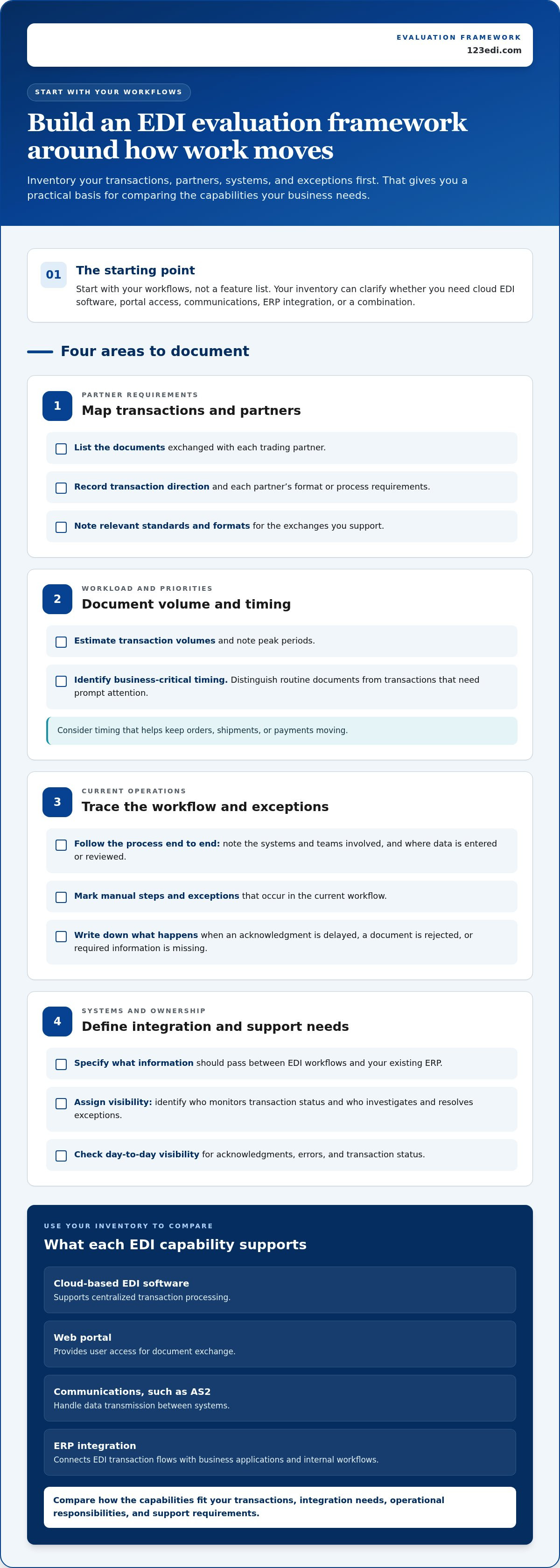
Start with your workflows, not a feature list. Inventorying what moves between your business and its trading partners helps clarify whether you need cloud software, portal access, communications, ERP integration, or a combination. It also gives implementation teams a practical foundation for planning.
Build an evaluation framework
- Map transactions and partners. Record the documents exchanged with each partner, the direction of each transaction, and any partner-specific format or process requirements. GS1’s information on global EDI standards can help clarify the standards and formats relevant to your exchanges.
- Document volume and timing. Note approximate transaction volumes, peak periods, and business-critical timing. Distinguish routine documents from those that need prompt attention to keep orders, shipments, or payments moving.
- Trace the current workflow. Identify the systems and teams involved, where data is entered or reviewed, and where manual steps or exceptions occur. Write down what happens when an acknowledgment is delayed, a document is rejected, or required information is missing.
- Define integration and support needs. Specify which information should pass between EDI workflows and your existing ERP, who will monitor transaction status, and who should investigate and resolve exceptions.
Which questions reveal whether an EDI solution fits?
Use your inventory to ask practical questions: Which document types and trading partners must the workflow support? How does each transaction move through your business, and when does timing become critical? Can users see acknowledgments, errors, and transaction status in a way that supports their daily responsibilities?
Then compare how each capability fits into your operating model. Cloud-based EDI software can support centralized transaction processing; a web portal can provide user access for document exchange; communications such as AS2 handle data transmission. 123 EDI provides cloud-based EDI, software, portals, communications, and integration, so you can assess how these capabilities align with your workflows. For more on deployment models, see Comprehensive Guide to Cloud-Based EDI Solutions, including its discussion of cloud-based EDI solution options.
How should you assess ERP integration and implementation support?
List the information that should flow between EDI and your ERP, such as order details or document status, and identify which team uses it at each step. Planning should account for mapping partner requirements to ERP data, testing representative transactions, and assigning ownership when exceptions arise. Mastering EDI Integration with ERP offers further context on EDI and ERP integration planning.
As you refine your requirements, review how 123 EDI’s EDI capabilities relate to your planned workflows and integration needs.
EDI Software Company Comparison: Software, Portals, and Managed Communications
Cloud-based EDI software, portals, and communications address different parts of an exchange. They aren’t necessarily competing choices: a business may use software to process transactions, a portal for certain users or partners, and a communications method such as AS2 to transmit data. The right mix depends on how documents enter your workflows, which systems need to connect, and who manages each step.
| Capability | User workflow | Integration needs | Visibility and responsibilities |
|---|---|---|---|
| Cloud-based EDI software | Users manage electronic transactions through a centralized EDI environment. | May connect EDI processes with an ERP or other business systems, depending on the workflow. | Supports transaction monitoring; teams still need to define who reviews exceptions and follows up. |
| Web-based EDI portal | Users access the portal to exchange or work with documents online. | Can provide a portal-based workflow where direct system integration isn’t the primary method. | Users work with documents through the portal and need clear responsibility for checking status and resolving issues. |
| EDI communications | Systems send and receive EDI data using an agreed communication method, such as AS2. | Must fit the connection requirements of the systems and trading partners involved. | Operational ownership includes monitoring exchanges and responding to communication or transaction issues. |
When does cloud-based EDI software suit connected workflows?
Cloud-based tools can bring transaction exchange and monitoring into a shared environment. They can suit workflows where EDI needs to connect with an ERP, coordinate data across trading partners, or give internal teams a consistent view of document activity. The fit also depends on who owns the underlying business steps: software can support the process, but teams still need agreed roles for reviewing transactions and acting on exceptions. For a deeper look at delivery models, consult a guide to cloud-based EDI solutions.
When can an EDI portal or AS2 communications capability help?
A portal can support web-based document exchange and partner interactions, particularly when users need to work with documents through an online interface. AS2, by contrast, is a communications protocol for exchanging data between systems. It’s one possible method, not the only one; the choice should reflect partner requirements and how the exchange fits into your operations. Businesses exploring AS2 as a service can consider how AS2 communications fit alongside their software, portal, and integration needs.
An edi software company can bring these capabilities together so the exchange method, user experience, and connected workflows are considered as parts of one operating model.
What to Expect When an EDI Software Company Implements Your Workflows
A well-planned implementation connects partner requirements, EDI transactions, and the systems your team already uses. The work typically moves through discovery, requirements mapping, configuration, partner coordination, testing, and ongoing monitoring. The order and scope can vary based on your ERP and other systems, the trading partners involved, and the complexity of each workflow.
Staging the work helps teams identify gaps before transactions become part of routine operations. Agree early on who owns each task, how issues will be reported, and who decides when a workflow is ready to move forward.
How do discovery and testing prepare EDI workflows?
Discovery establishes how information moves today and what the new workflow needs to support. Document the business documents exchanged, relevant business rules, ERP touchpoints, partner specifications, and the teams involved. During requirements mapping and configuration, these details guide how transaction data is handled and where it must go.
Partner coordination and testing provide a structured way to validate the exchange before operational use. Teams can check whether data is mapped as expected, required information is present, and acknowledgments and transaction status are handled correctly. If a test reveals an error, document its cause, assign an owner, correct the mapping or configuration, and repeat the relevant test.
End-to-end transaction testing matters because it verifies that data can move through the complete workflow, from its source system to the trading partner and back through the expected status or acknowledgment process, before the workflow goes live.
Where possible, phase the rollout by workflow or partner, with clear criteria for advancing to the next stage. This gives the teams involved a defined way to review results and address issues without treating the entire implementation as one all-or-nothing change.
What does ongoing EDI support help teams manage?
Implementation doesn’t end at launch. Teams still need visibility into transaction activity, a consistent approach to exceptions, and a process for responding when partner requirements or business workflows change. Define which internal roles monitor status, investigate business-data issues, and coordinate partner follow-up. Clarify the integration partner’s responsibilities too, particularly for EDI configuration and workflow-related questions.
As an edi software company, 123 EDI combines EDI capabilities with professional integration support. That support can help align EDI workflows with existing ERP systems and address implementation needs. Explore EDI integration support as you plan how responsibilities will be shared across your team and EDI workflows.
Is 123 EDI the Right EDI Software Company for Your Organization?
123 EDI provides EDI software, cloud services, portals, communications, and ERP integration for business workflows. To assess the fit, consider how your trading partners exchange documents, which systems need to share data, and how your team manages transaction activity. Compare those needs with the capabilities and responsibilities you want in an EDI solution.
Which 123 EDI capabilities align with common EDI needs?
123 EDI brings together several parts of B2B data exchange. Each plays a distinct role in connecting partner transactions with internal processes:
- Cloud-based EDI and software support the processing and management of electronic transactions.
- EDI portals give users a web-based way to access and exchange documents.
- EDI communications, including AS2, support the transmission of data between systems.
- ERP integration connects EDI workflows with existing platforms, helping business data move between partner exchanges and internal processes.
Connected EDI operations bring software, communications, and integration together so business documents can move between trading partners and internal workflows. This combination can help reduce manual transaction handling while your team defines who monitors activity and resolves exceptions.
How can a business take the next step with 123 EDI?
Before discussing an implementation, outline the information that will clarify your operational priorities. Note the systems involved, the trading partners you exchange documents with, the transaction types and approximate volumes, and any workflow steps that currently rely on manual handling. Also identify where exceptions occur, who needs transaction visibility, and which team members coordinate partner communication.
With those details in hand, the conversation can focus on how cloud-based EDI, software, portals, communications, and ERP integration relate to your requirements. This creates a practical basis for discussing workflow scope, partner needs, implementation priorities, and shared responsibilities.
If you’re ready to explore how 123 EDI’s capabilities could fit your organization’s workflows, discuss your EDI requirements with 123 EDI.
Build an EDI Partnership Around Your Workflows
Choosing an edi software company starts with understanding your trading-partner requirements, transaction flows, existing systems, and the people responsible for monitoring exceptions. The right approach should connect those needs, not leave EDI operating apart from your business workflows.
As you evaluate options, distinguish the roles of software, portals, and communications, then consider how they can work together. A sound implementation plan also includes ERP integration, partner coordination, end-to-end testing, and clear ownership of ongoing issues.
123 EDI brings together cloud-based EDI software and portals, communications including AS2, ERP integration, and professional integration support. Discuss your EDI needs with 123 EDI to explore how these capabilities can align with your workflows.
With your requirements clearly mapped and the right support in place, you can take the next step toward more connected, manageable EDI operations.
Frequently Asked Questions
What does an EDI software company do?
An EDI software company provides tools and services that help businesses exchange structured electronic documents with trading partners. Its software can translate business data into partner-required formats, route transactions, and provide visibility into processing status. Depending on the solution, the company may also provide communications, portal access, or integration with an ERP system. This specialized role differs from general IT support because it focuses on EDI workflows and partner transactions.
How do I choose an EDI software company?
Choose an edi software company by comparing its capabilities with your workflows, systems, and trading-partner requirements. Document the transaction types and approximate volumes you handle, your current ERP or other business systems, partner connection needs, and where exceptions occur. Then assess how software, portals, communications, integration, and implementation support fit together. Clarify how transactions will be tested and who will monitor activity and take ownership of issues after launch.
What is the difference between EDI software and an EDI portal?
EDI software processes and manages electronic transactions, while an EDI portal provides a web-based place for users to access or exchange documents. Software may handle data mapping, validation, routing, and transaction visibility as part of an EDI workflow. A portal focuses on user access and document interaction. The two can work together: software can manage transaction processing while users or trading partners interact through a portal.
Can EDI software integrate with an existing ERP system?
Yes, EDI software can integrate with an existing ERP system so business information can flow between internal workflows and trading-partner transactions. For example, order or invoice data may move between an ERP and EDI processes, depending on the requirements. Integration planning should identify which data needs to move, how it should be mapped, and how transactions will be tested. The approach depends on the ERP, partner requirements, and workflow complexity.
How long does EDI implementation take?
Implementation timing varies, so there isn’t one timeline that applies to every business. The scope depends on factors such as the systems involved, the number and requirements of trading partners, the transaction workflows being configured, and the testing needed. Discovery, mapping, configuration, partner coordination, and validation all contribute to the plan. Establishing requirements and responsibilities early helps teams understand the sequence of work and prepare for each stage.
Does an EDI software company help connect trading partners?
Yes, an EDI software company can support the process of connecting trading partners by aligning document requirements, communication methods, and transaction workflows. Partner onboarding may involve mapping data, configuring the exchange, coordinating with the trading partner, and testing transactions and acknowledgments. Define who handles partner communication and who investigates issues during testing. Clear responsibilities help both sides work through setup requirements and prepare the exchange for operational use.
What should an EDI software company provide after implementation?
After implementation, businesses need a way to monitor transaction status, identify exceptions, and coordinate responses when partner requirements or workflows change. An EDI company’s ongoing support should align with the agreed scope and clarify which issues its team handles and which remain with your internal staff. For example, teams can define who reviews rejected documents, who investigates data errors, and how changes are communicated and tested before being put into use.