

QuickBooks Enterprise can record your business activity, but it doesn’t natively exchange EDI documents with trading partners. Without an integration, teams may need to rekey orders and invoices, adding work and increasing the risk of errors. EDI for QuickBooks Enterprise connects partner documents with the workflows your business already relies on.
If you’re concerned that integration could disrupt accounting or fulfillment, start by identifying which documents should flow between systems and how each one fits your operation. The goal is to connect EDI with processes that already work, not to change them unnecessarily. This guide explains how documents move, what to plan before implementation, and how to assess an approach for your trading partners and business needs.
You’ll also learn why document mapping, communication requirements, and end-to-end testing matter before go-live. Planning for partner requirements and existing workflows can reduce manual handling and give your team a clearer process for managing transactions and exceptions.
Key Takeaways
- EDI for QuickBooks Enterprise links structured trading-partner documents to business processes, from order receipt through fulfillment.
- Trace each document through translation, field mapping, processing, and partner responses to see where information moves.
- Compare portal-based, software-led, and cloud-based EDI by integration depth, visibility, onboarding effort, and internal workload.
- Prepare by documenting partner requirements, transaction types, current workflows, testing needs, and exception owners.
- 123 EDI’s cloud EDI, communications, portal, software, and ERP integration services bring partner rules and business workflows into a coordinated plan.
What EDI for QuickBooks Enterprise Does in Everyday Operations
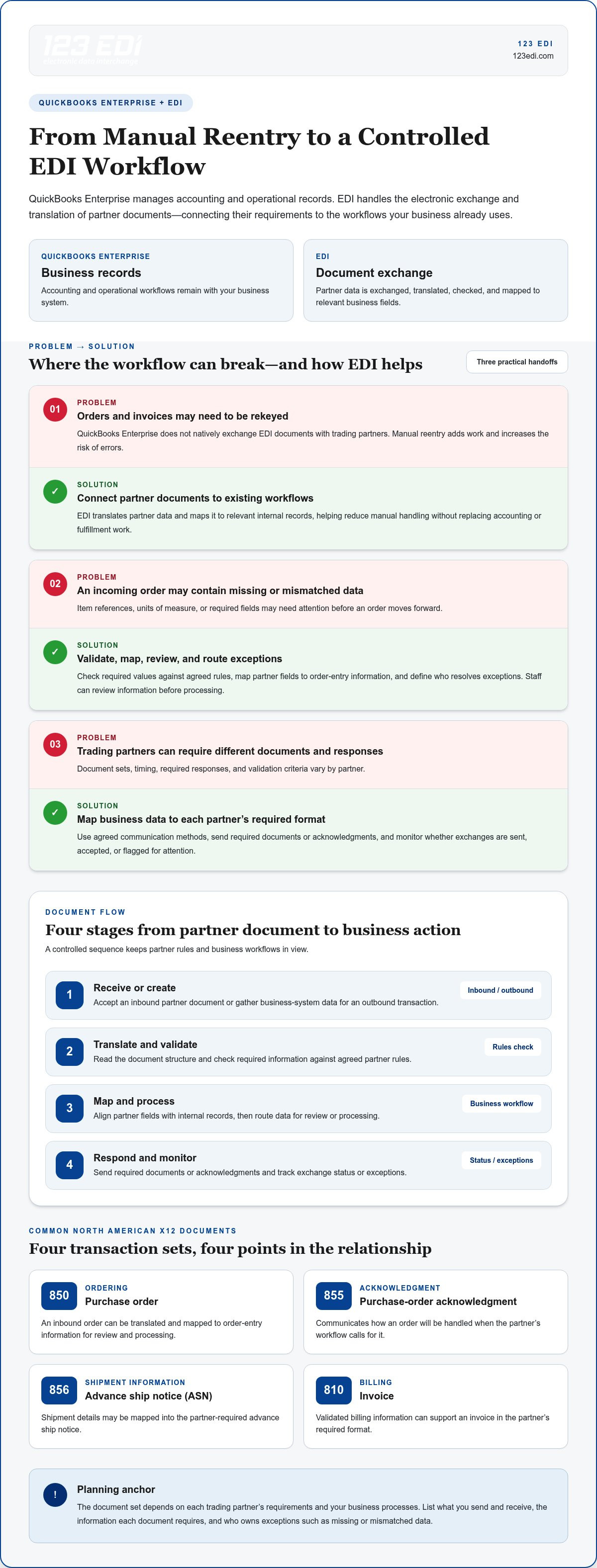
EDI for QuickBooks Enterprise connects structured business documents exchanged with trading partners to workflows that use QuickBooks Enterprise, translating partner data into a format the business system can use. QuickBooks Enterprise remains the system where a business manages accounting and operational records. EDI handles the electronic exchange and translation of documents. Because QuickBooks Enterprise doesn’t provide native EDI document exchange, an EDI solution connects partner requirements with the processes already in place.
This distinction helps set realistic expectations. EDI can reduce manual handling by moving document data between trading partners and business workflows, rather than relying on staff to rekey every field. Teams still need to decide how incoming information is reviewed and acted on, and how outgoing documents reflect accurate business records. The aim is a coordinated flow, not a replacement for accounting or fulfillment work.
Where EDI Fits Between Trading Partners and QuickBooks Enterprise
A partner sends a document in an agreed EDI format. The EDI system receives and translates it, then maps external fields, such as item identifiers, quantities, and delivery details, to corresponding internal records. The business system can then support the next step, such as reviewing an order or recording invoice activity. For outbound documents, business data is mapped to the partner’s required format and sent using the agreed communication method. EDI handles the exchange; your business workflows determine what happens next.
For example, an incoming purchase order can be translated and mapped to order-entry information for review and processing. Fulfillment staff then use established procedures to prepare and ship the order. Connecting these steps can reduce duplicate data entry while keeping responsibility for business decisions with the appropriate team.
Which Business Documents Commonly Move Through EDI
In North America, common X12 transaction sets include the 850 purchase order, the 810 invoice, and the 856 advance ship notice (ASN). A partner may also require an 855 purchase-order acknowledgment to confirm how an order will be handled. These documents support different points in a trading relationship: ordering, acknowledgment, shipment information, and billing.
The document set depends on each trading partner’s requirements and your business processes. Before planning an integration, list the documents you send and receive, the information each requires, and the team responsible for exceptions such as missing or mismatched data. For a foundational overview of Electronic Data Interchange (EDI), see how standardized electronic documents support business-to-business exchange.
How QuickBooks Enterprise EDI Integration Moves Data Step by Step
Think of the integration as a controlled sequence, not a direct handoff that bypasses your business rules. A document arrives from a partner or is prepared from business-system data. It is translated into the format needed on the other side, checked against partner requirements, and mapped to relevant fields. Then it moves into the appropriate business workflow, with a response or status update returned when required.
- Receive or create: Accept an inbound partner document or gather data for an outbound transaction.
- Translate and validate: Read the document structure and check required information against agreed rules.
- Map and process: Align partner fields with internal records, then route the data for review or processing.
- Respond and monitor: Send required documents or acknowledgments and track exchange status or exceptions.
For EDI for QuickBooks Enterprise, the connection and processing steps are defined during implementation. Partner specifications, field mappings, and validation rules determine what data is required and how exceptions are handled. A practical overview of ERP integration implementation can help frame these decisions alongside your existing workflows.
Inbound Purchase Orders and Order Processing
An inbound X12 850 purchase order arrives through the agreed EDI communication channel. The EDI system translates it, checks required values, and maps details such as partner identifiers, item numbers, quantities, and requested dates to relevant order-entry fields. Depending on the workflow, staff may review the information before it moves to the next step. Missing or mismatched values should follow a defined exception process rather than being treated as a valid order automatically.
After review and processing, the order can inform fulfillment planning, inventory coordination, and shipment preparation. Assign clear ownership so staff know who resolves an invalid item reference, an unexpected unit of measure, or a required field that wasn’t supplied.
Outbound Invoices, Ship Notices, and Acknowledgments
For outbound transactions, validated business data can be mapped into a partner-required invoice or shipping document. Shipment details, for example, may populate an 856 advance ship notice, while billing information may support an 810 invoice. An 855 purchase-order acknowledgment can communicate how an order will be handled when the partner’s workflow calls for it.
Document timing, required responses, and validation criteria vary by partner. Monitoring should show whether a document was sent, accepted, or flagged for attention, so teams can address exceptions before they interrupt routine work. A coordinated EDI integration approach can align communications, mappings, and partner rules with established business processes.
Choosing an EDI Approach for QuickBooks Enterprise
The right setup depends on how trading-partner documents fit your daily work, not simply on which option has the most features. A portal may suit a small number of transactions that staff can manage manually. As partner count or document volume grows, repeated entry and exception handling can put more demands on the team. Software-led or cloud-based EDI can connect document exchange more closely to business-system workflows, with integration depth shaped by the implementation.
Use this comparison as a starting point. Actual workflows depend on partner requirements, available integration methods, and how your business assigns review and exception tasks.
| Approach | Integration depth | Partner onboarding effort | Visibility | Internal workload |
|---|---|---|---|---|
| Manual partner portals | Usually centered on portal interaction rather than mapped system flows | Staff may need to learn each partner’s portal process | Information is viewed in each portal | More user entry, uploads, and follow-up |
| Software-led EDI | Can translate and map documents for defined workflows | Requires partner-specific setup and document mapping | Depends on the software’s transaction and exception views | Less repetitive handling when workflows are automated |
| Cloud EDI with integration support | Coordinates exchange and connections to business-system processes | Partner requirements, communications, and mappings are planned together | Can provide a shared view of exchanges and exceptions | Work shifts toward oversight and resolving exceptions |
Portal-Based EDI Versus Integrated EDI Workflows
With a portal workflow, staff may log in to review an order, enter information, or upload a document. That can be manageable when transaction volume is modest and the team has capacity to handle each step. Integrated EDI workflows map partner data to business-system processes, reducing repeated entry where the implementation supports it. Consider partner count, document volume, staffing, and the time needed to resolve exceptions before deciding how much integration is appropriate.
Cloud EDI, Communications, and Integration Support
A cloud EDI service can coordinate document exchange, partner communications, and integration workflows in one approach. AS2 is a secure communication option used for direct business-to-business EDI when required by a trading partner. Cloud delivery doesn’t remove the need for careful mapping or testing; it provides a way to organize those elements alongside partner onboarding and transaction visibility. Explore this cloud-based EDI solutions guide for more on the model.
For EDI for QuickBooks Enterprise, weigh the level of automation you need against the expertise and attention your team can dedicate to daily EDI work. 123 EDI’s cloud EDI integration services bring partner rules, communications, and existing workflows into a coordinated plan.
How to Prepare and Implement EDI for QuickBooks Enterprise
A dependable implementation starts with your existing work, not just the connection between systems. Before configuring document flows, inventory QuickBooks Enterprise workflows, trading partners, transaction types, and the people who handle exceptions. This gives the project team a clear view of what must keep working during the transition and where EDI should fit.
Plan the work in stages:
- Discovery: Document current order, fulfillment, invoicing, and accounting processes, including manual handoffs and known pain points.
- Partner requirements: Gather each partner’s implementation guide, document versions, required fields, communication method, timing, and response expectations.
- Mapping and configuration: Align partner data with appropriate internal records and define required transformations and validation rules.
- Testing: Run representative transactions and resolve mapping or workflow issues before production exchange.
- Launch and monitoring: Define ownership, escalation paths, and procedures for tracking transactions after go-live.
Keep open transactions in view, too. Decide how orders already in progress will be completed, which process applies during the transition, and who communicates with partners if an issue delays an exchange. Clear responsibilities help prevent uncertainty for staff and trading partners.
Document Requirements, Data Mapping, and Testing
Partner guides provide the working specifications for implementation. Record mandatory fields, document versions, identifiers, response expectations, and partner-specific rules. Then map those requirements to relevant internal records, noting where values need to be transformed or supplied from another source. Test routine and problem cases, including valid documents, missing data, rejected transactions, and acknowledgments. Complete partner validation and successful test scenarios before production exchange.
Testing should also reflect real handoffs between teams. Confirm who reviews flagged data, how corrections are made, and whether an updated document can continue through the intended workflow. The goal is a repeatable process, not simply confirmation that a file can be transmitted.
Go-Live Monitoring and Exception Management
Before launch, assign owners for monitoring transactions, reviewing errors, and communicating with trading partners. Decide how the team will recognize successful exchanges, rejected documents, delays, and unresolved exceptions, and where each issue should be escalated. This gives staff a consistent response path when a transaction needs attention.
After go-live, review exceptions and refine mappings or procedures as partner requirements and business workflows change. A measured rollout, with responsibilities and transition steps documented, can help protect day-to-day operations while the new exchange process takes hold.
123 EDI helps coordinate partner requirements, mappings, and existing workflows through EDI integration services.
Connect QuickBooks Enterprise EDI Workflows with 123 EDI
A useful integration begins with your business priorities: which partner documents create the most manual work, where information needs to flow, and how teams will manage exceptions. 123 EDI offers cloud-based EDI, EDI software and portal services, communications, and ERP integration. These services bring trading-partner rules and document mappings into a coordinated approach that fits existing workflows and keeps QuickBooks Enterprise in its established role.
Every organization has its own trading relationships and processes. Integration planning should account for the systems involved, the documents partners exchange, and the communication requirements that apply. This shapes a project around operational needs rather than assuming every business should use the same transaction flow or implementation path.
What a Collaborative Integration Project Addresses
Early planning brings current workflows, trading partners, transaction documents, and operational priorities into view. Mapping then connects partner data to appropriate business records, while communication requirements guide how documents are exchanged. Review these elements together before production exchange to align partner expectations with internal processes. 123 EDI’s EDI integration services connect EDI systems with ERP platforms and organize the project around the organization’s systems and partner requirements.
A coordinated approach also considers secure business data exchange and the people responsible for day-to-day work. Clear processes for reviewing information, addressing exceptions, and monitoring transactions help teams understand how the integration fits into their responsibilities.
Questions to Resolve Before Moving Forward
Before defining the initial scope, clarify a few practical points with your team:
- Which trading partners and transaction documents should be included first?
- Who will review data, handle exceptions, communicate with partners, and monitor exchanges?
- What workflow outcome matters most, such as reducing manual entry or improving visibility into document status?
- What testing and partner validation should be completed before production exchange?
These answers help frame EDI for QuickBooks Enterprise around specific business outcomes, not technology alone. They also give everyone involved a shared understanding of the initial scope and the responsibilities that continue after launch.
123 EDI works with organizations to align EDI communications, document mappings, and ERP workflows as part of an integration plan. Discuss your EDI integration needs and take the next step toward a partner exchange process that fits your business.
Build a More Dependable EDI Workflow
A successful integration connects trading-partner documents with the workflows your business already uses. Start by identifying which documents need to move, how partner data should map to internal records, and who will handle testing, exceptions, and ongoing monitoring. This planning can reduce manual effort while keeping accounting and fulfillment processes clear.
For EDI for QuickBooks Enterprise, QuickBooks Enterprise remains your business system, while EDI supports document exchange and translation. A dependable implementation aligns partner requirements, communications, mappings, and validation before production exchange begins.
123 EDI specializes in cloud-based EDI and integration with ERP systems, with EDI portals, communications, and AS2 among its offerings. A coordinated approach brings these elements together around your trading partners and operational priorities. Discuss your QuickBooks Enterprise EDI integration needs and take a practical next step toward a workflow that fits your business.
With clear requirements and thoughtful preparation, your team can build an EDI process designed to support the way you work.
Frequently Asked Questions
What does EDI for QuickBooks Enterprise do?
EDI for QuickBooks Enterprise connects structured business documents exchanged with trading partners to workflows that use QuickBooks Enterprise. An EDI solution receives or prepares documents, translates their format, and maps partner fields to relevant business records. This can reduce repeated manual entry, while QuickBooks Enterprise remains the system used for accounting and operational work. The documents and steps depend on partner requirements and the organization’s processes.
Can QuickBooks Enterprise send and receive EDI documents?
QuickBooks Enterprise doesn’t have native EDI capabilities for exchanging trading-partner documents. A separate EDI solution handles document translation, partner communications, and the connection to business workflows. Depending on the implementation, information can be mapped between EDI documents and QuickBooks-related records, with staff review steps built into the process. The integration plan should account for company workflows, partner specifications, and the documents that need to move in each direction.
Which EDI transaction sets are commonly used with QuickBooks Enterprise?
Common North American X12 transaction sets include the 850 purchase order, 810 invoice, and 856 advance ship notice. A trading partner may also require an 855 purchase-order acknowledgment in response to an order. These documents support different stages of a business relationship, from ordering to shipment and billing. The right set depends on each partner’s specifications and the organization’s operational processes, so inventory document requirements during planning.
How does EDI integration with QuickBooks Enterprise work?
An EDI integration receives a partner document or prepares one from business-system data, translates it, validates required information, and maps fields to appropriate records or an outbound format. The information then follows the agreed workflow, which may include staff review and exception handling. Required responses and status monitoring are also defined as part of the process. For EDI for QuickBooks Enterprise, connection methods and workflows are established during implementation.
Do I have to replace QuickBooks Enterprise to use EDI?
No. EDI can be added alongside QuickBooks Enterprise through a separate integration approach, so replacing the accounting or operational system isn’t inherently required. QuickBooks Enterprise can continue to support existing business processes while an EDI solution manages partner document exchange and translation. Planning should identify how data will move between systems, which workflows will be affected, and where staff review or approval remains part of the process.
How long does QuickBooks Enterprise EDI implementation take?
Implementation timing varies with project scope and readiness, so there isn’t one reliable timeline for every business. Factors include the number of trading partners and documents, the completeness of partner specifications, mapping requirements, connection method, testing needs, and internal review processes. A clear inventory of workflows, owners, and exceptions helps define the work involved. Complete partner testing and validation before production exchange begins.
Is cloud EDI suitable for a QuickBooks Enterprise business?
Cloud EDI can suit a QuickBooks Enterprise business that wants to coordinate trading-partner document exchange and communications through a cloud-based EDI approach. Suitability depends on partner requirements, the organization’s workflows, desired integration depth, and how staff will monitor transactions and exceptions. Cloud EDI can be part of an ERP integration plan, but it doesn’t remove the need to define mappings, test document flows, and assign responsibility for ongoing review.