

A chargeback notice rarely explains the whole story. The original error may sit somewhere between a retailer’s routing guide, a manually checked order, and an EDI transaction passed through the ERP. Learning how to avoid EDI chargebacks starts with tracing that chain, not simply fixing the deduction in front of you.
Retailer requirements can vary by trading partner, and the evidence may be spread across documents, scorecards, and systems. Manual checks and disconnected handoffs make it easier for the same issue to return, even after a team has resolved it once.
A practical approach is to turn retailer rules into repeatable, traceable workflows. This guide explains how to identify the operational cause behind a chargeback, organize partner-specific requirements, and establish checks that catch errors before transactions reach the retailer. It also shows how connected EDI and ERP workflows can improve transaction visibility and clarify who owns each exception. With a consistent process, teams can investigate chargebacks more efficiently and make compliance part of everyday operations.
Key Takeaways
- Trace each chargeback to its operational cause by reviewing the related transaction, timing, and supporting records.
- Map retailer requirements to each stage of the order-to-cash process to identify risky handoffs and data differences.
- Learn how to avoid EDI chargebacks with a repeatable cycle for capturing partner rules, validating data, monitoring exceptions, and reviewing outcomes.
- Keep each retailer’s current routing requirements and implementation documents in a controlled source so teams can apply consistent checks.
- Connected EDI and ERP workflows can improve transaction visibility and clarify exception ownership across teams.
How EDI chargebacks happen, and what suppliers can control
An EDI-related chargeback is a retailer deduction tied to a claimed operational or compliance failure in a supplier’s transaction or fulfillment process. An EDI error is a problem with electronic data or its transmission. A chargeback is the retailer’s financial response to an alleged failure, which may or may not stem directly from the EDI system.
Retailers may use the term differently from an invoice dispute, payment delay, or other deduction. Start with the notice and the retailer’s documentation, because the label alone does not identify the cause. Connect the deduction to the relevant purchase order, acknowledgment, shipment notice, invoice, label, or routing instruction. Then compare those records with the retailer’s stated requirements.
Electronic Data Interchange (EDI) provides a structured way to exchange business documents between organizations. That structure supports consistent transactions, but it does not replace adherence to each partner’s requirements. Data can be transmitted successfully and still be late, incomplete, or inconsistent with the order or shipment. To understand how to avoid EDI chargebacks, examine both the electronic transaction and the business process behind it.
Which supplier processes can trigger a chargeback?
Possible causes include shipment data that does not match the order, a late or missing shipment notice, required fields left blank, or quantities that differ across documents. These are common possibilities, not universal retailer rules. For example, if the shipment notice and physical shipment show different quantities, receiving may be affected and invoice reconciliation may take more work.
Labels and routing instructions matter, too. A shipment can contain the correct goods and still fail a partner’s process if its labels or routing details do not meet the partner’s stated requirements. Trace the issue across the relevant records rather than assuming the first visible error is the original cause.
Why chargeback rules differ by trading partner
Retailer routing guides and partner implementation documents describe operational expectations, including how transactions should be completed and when information is due. Shared EDI standards provide a common structure for exchanging data, but they do not make every retailer’s business rules identical. Requirements differ across partners, and documentation can change, so use each partner’s current materials for specific instructions.
Keep applicable documents easy to locate and connect each requirement to the transaction or process it governs. This gives teams a consistent reference when checking an order, investigating a deduction, or updating a workflow. It also helps distinguish a transmission issue from a mismatch between supplier practices and a retailer’s rules.
How EDI transactions create, or prevent, chargeback risks
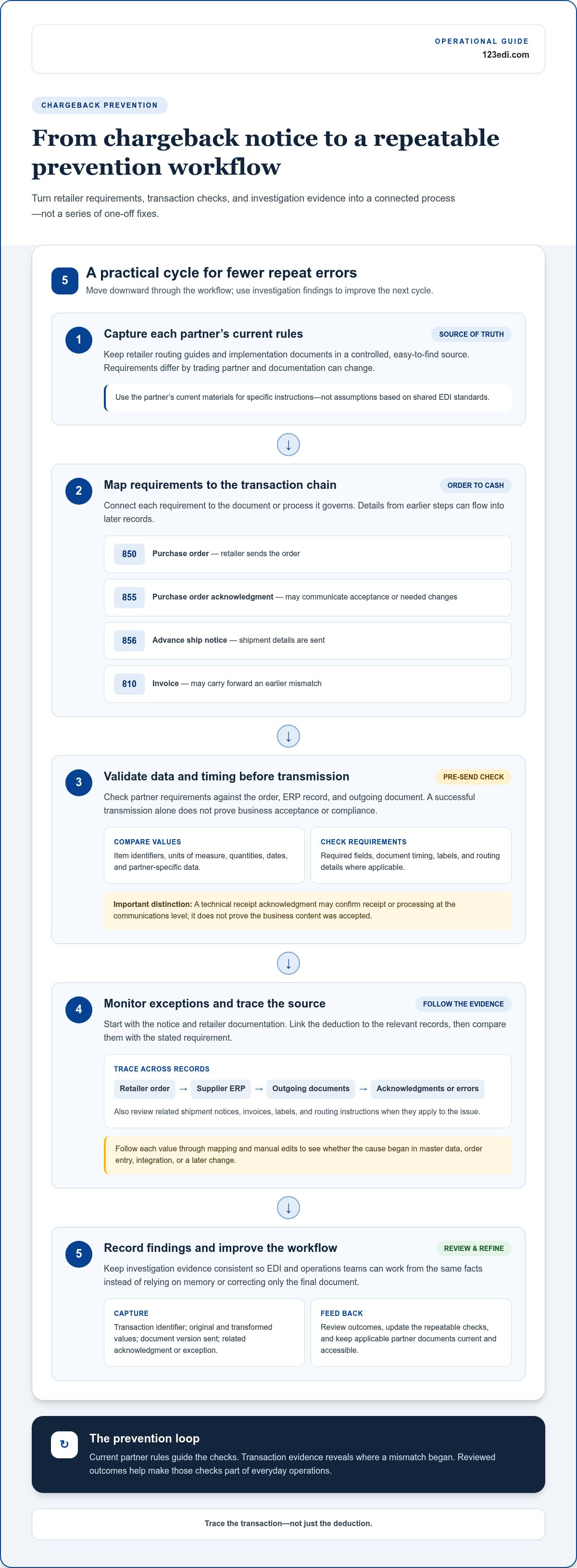
Chargeback risk can travel through a transaction chain long before a deduction appears. A retailer sends a purchase order, often an EDI 850. The supplier processes it and may return an EDI 855 purchase order acknowledgment. Later, shipment details may be sent in an EDI 856 advance ship notice, followed by an EDI 810 invoice. Because each document draws on information from earlier steps, an inaccurate order detail can carry into the shipment record and invoice.
Acknowledgments provide useful checkpoints. An 855 can communicate whether an order is accepted or whether changes are needed, depending on the partner workflow. A technical receipt acknowledgment, by contrast, may confirm that a message was received or processed at the communications level. Do not treat receipt as proof that the retailer accepted the business content or that it meets every operational rule.
Follow the data, not just the deduction
Suppose an order lists an item identifier or unit of measure that differs from the supplier’s ERP record. If the difference is not caught during order review, the shipment notice may report an item or quantity that does not match the retailer’s expectation. The invoice can then inherit the mismatch. To trace the exception, compare the retailer’s original order, the supplier’s ERP record, each outgoing document, and any related acknowledgments or error messages.
Timing matters as well. A document may be delivered successfully but sent after the partner’s required event or deadline. A smooth transmission is only one part of the process. Data accuracy, business acceptance, and compliance with partner instructions require separate checks.
Find failure points between EDI and the ERP
At the integration boundary, field mapping determines how information moves between an EDI document and ERP fields. When a value changes or disappears, review item identifiers, units of measure, quantities, dates, and partner-specific data. Follow the value from the source record through each transformation to the outgoing transaction. This helps identify whether the issue began in master data, order entry, mapping, or a later manual edit.
For a repeatable investigation, record the transaction identifier, original and transformed values, document version sent, and related acknowledgment or exception. Operations and EDI teams can then work from the same evidence instead of relying on memory or correcting only the final document. The EDI integration with ERP guide offers additional context on connecting these workflows.
As teams improve how to avoid EDI chargebacks, a transaction-level view can turn one-off investigations into practical process improvements. Industry organizations such as the Retail Value Chain Federation (RVCF) provide broader retail value-chain context. For the rules that apply to a specific transaction, use the relevant partner documents. Connected EDI and ERP workflows can make data movement and exception ownership easier to follow. Explore EDI and ERP workflow options to learn about a connected approach.
Compare chargeback causes, evidence, and corrective responses
A chargeback notice is a starting point for investigation, not proof that the deduction is valid. Compare its reason and transaction references with your records and the retailer’s current requirements. The examples below are common investigation paths, not universal retailer rules. Evidence, dispute windows, and available remedies depend on each partner’s documented process.
| Possible cause | Likely transaction or process | Evidence to inspect | Corrective action |
|---|---|---|---|
| Shipment timing | Shipment notice or routing process | Order and routing instructions, shipment records, notice timestamps, and acknowledgments | Compare required timing with actual events; address the handoff or scheduling step that caused a delay. |
| Data mismatch | Order, acknowledgment, shipment notice, or invoice | Purchase order, related EDI documents, item and quantity records, and ERP data | Identify where the value changed or was entered incorrectly; correct the source data or workflow. |
| Labeling issue | Warehouse preparation and shipment documentation | Partner instructions, label records, shipment details, and available warehouse documentation | Review the applicable labeling instructions and adjust the preparation check that missed them. |
| Invoice discrepancy | Invoice and order-to-cash reconciliation | Purchase order, acknowledgment, shipment and receipt records, invoice, and payment detail | Reconcile the values, then correct the source or clarify the discrepancy through the retailer’s process. |
Match chargeback notices to transaction evidence
Start with the notice’s reference numbers, dates, and stated reason. Match them to the purchase order, acknowledgment, shipment notice, invoice, and relevant warehouse records. Keep document identifiers, timestamps, acknowledgments, and related correspondence together so reviewers can follow the sequence of events. If the records support a dispute, use the retailer’s stated submission process and deadline. Do not assume one partner’s rules apply to another.
Separate one-time exceptions from recurring causes
Classify each incident by trading partner, transaction type, item, process step, and root cause. An isolated data-entry mistake needs a different response from a recurring mapping issue or a workflow that repeatedly misses a required check. Assign an owner from operations, finance, IT, or customer service, as appropriate, and record the action and outcome. Root-cause classification helps teams target the process that needs attention.
Use the findings to update a specific check, data source, or handoff, then review later incidents to see whether the cause has changed. This turns chargeback analysis into a practical control process. Teams can distinguish one-off exceptions from patterns, support a retailer dispute with relevant records, and direct corrective work to the responsible process. This evidence-based approach is an important part of how to avoid EDI chargebacks without assuming every deduction has the same cause or remedy.
Build a repeatable process to prevent EDI chargebacks
Prevention works best as a managed cycle, not as a series of one-time fixes. Give each trading partner a controlled source for current implementation documents and routing requirements. Assign clear ownership for updates, exceptions, disputes, and recurring root-cause reviews. This helps teams apply the right rule at the right point in a transaction.
- Capture partner rules. Store each partner’s current requirements in an accessible, version-controlled location. Record who verifies updates and communicates changes to affected teams.
- Validate data. Check required fields and business rules against the relevant ERP records and EDI documents before transactions are sent.
- Monitor exceptions. Route errors and unusual responses to an identified owner so they can be reviewed before the process continues.
- Document evidence. Keep transaction identifiers, timestamps, acknowledgments, and related records together for investigation or a retailer dispute.
- Review outcomes. Group incidents by partner, transaction, and root cause. Use scorecards or regular reviews to focus on repeated problems without assuming one benchmark applies to every retailer.
Validate partner rules before transactions leave the ERP
Translate each partner’s requirements into checks tied to the relevant ERP fields and EDI documents. Test representative transactions, including exceptions such as changed order details, and repeat the review when partner specifications change. Assign responsibility for maintaining mappings and recording revisions so teams know which requirements were applied and who owns future updates.
Separate preventive controls from post-chargeback investigation. Preventive controls reduce the chance of an avoidable error. Investigation controls help establish what happened and how to respond.
- Preventive controls: Confirm partner documents are current, validate required fields and mapped values, test transaction scenarios, and define owners for exceptions.
- Post-chargeback investigation: Match the notice to the affected transaction, preserve relevant evidence, follow the retailer’s dispute process, and record the resolution.
Close the loop after every chargeback
For each incident, record the reason, affected transaction, evidence reviewed, accountable owner, corrective action, and outcome. If the cause is confirmed, feed it back into the appropriate mapping, data-quality check, training, or handoff. Review whether similar exceptions continue to appear. A completed dispute alone does not show that the underlying process has improved.
Cloud-based EDI workflows can help organize partner transactions, while ERP integration can support more consistent data movement between business records and EDI documents. 123 EDI provides cloud-based EDI solutions, portals, and integration with ERP systems to support connected workflows. The cloud-based EDI solutions guide provides further context on this approach. To explore how connected EDI workflows could support your prevention process, review EDI workflow options.
With this cycle in place, how to avoid EDI chargebacks becomes an operational discipline: capture the rule, build it into the workflow, investigate exceptions, and refine controls as evidence accumulates.
Use connected EDI workflows to strengthen chargeback prevention
Once recurring causes are clear, examine how information moves between your business systems, EDI workflows, and trading partners. Cloud-based EDI, an EDI portal, and ERP integration can help organize partner transactions and make document status and exceptions easier to follow. Their value comes from connecting processes more consistently, not from guaranteeing that chargebacks will disappear.
Connect EDI transactions with ERP processes
When employees re-enter order or shipment details across separate systems, each handoff creates another opportunity for a value to be mistyped, omitted, or changed. EDI integration with an ERP can connect business records with partner documents, reduce disconnected re-entry, and provide a clearer path from source data to transmitted transaction. Mapping and implementation should reflect the company’s ERP processes and trading-partner workflows.
That connection still depends on sound operating practices. Teams remain responsible for accurate source data, reviewing exceptions, and following each partner’s requirements. AS2 can serve as a communications option for exchanging EDI data, but it does not validate whether the business content is accurate or compliant. Transport, data quality, and partner-rule checks are distinct parts of the workflow.
A connected process also makes it easier to assign ownership. An exception involving an order field can go to the team responsible for that record, while a recurring mapping issue can be reviewed by the people who maintain the integration. An EDI portal can provide a shared point for working with partner transactions, and cloud-based EDI can support the broader exchange process. The practical design depends on which partners, documents, and ERP records need to work together.
Plan the next step around recurring chargeback causes
Begin with the most frequent documented causes rather than attempting to redesign every transaction flow at once. For each recurring issue, identify the partner requirement, affected EDI document, ERP source record, and teams responsible for the related handoffs. Then consider where a validation, clearer exception owner, or more consistent data flow could address the underlying cause.
- Review the pattern: Group chargebacks by partner, transaction type, and confirmed root cause.
- Trace the workflow: Identify the relevant partner rule, ERP data, EDI mapping, and communication step.
- Agree on ownership: Bring together the operations, finance, and technical stakeholders responsible for the affected process.
- Assess the change: Determine whether updated data practices, EDI software, cloud services, or ERP integration could support a more consistent workflow.
This focused approach makes how to avoid EDI chargebacks an ongoing improvement effort grounded in transaction evidence and partner requirements. For a practical next step, explore 123 EDI solutions for EDI software, cloud services, and integration aligned with your trading-partner workflows.
Turn chargeback insights into your next improvement
The next useful step is not to overhaul every transaction at once. Choose one recurring chargeback cause, identify where it begins, and agree on a practical change with the teams responsible. Review the results and use what you learn to guide the next improvement. This steady approach makes how to avoid EDI chargebacks an ongoing business practice, rather than a response that starts only after a deduction arrives.
As trading-partner workflows evolve, connected EDI and ERP processes can help teams work from consistent information and clarify who owns exceptions. Technology supports the process, while accurate source data, current partner requirements, and accountable follow-through remain essential. Reviewing transaction flows can help identify where EDI software, cloud services, portal access, communications, or integration may fit operational needs.
Explore 123 EDI solutions and discuss your EDI workflow to consider a next step shaped around your partner and ERP processes. With a clear starting point and the right people involved, your team can keep refining its approach with confidence.
Frequently Asked Questions
What is an EDI chargeback?
An EDI chargeback is a retailer deduction tied to an alleged operational or compliance failure. To assess one, identify the stated reason, affected document or shipment, and reference number. Then distinguish a compliance claim from a pricing or payment discrepancy in your accounts receivable records. Retailers may use different labels, so use the notice and applicable partner guidance to classify the deduction and decide which team should review it.
What are the most common causes of EDI chargebacks?
Common potential causes include incomplete transaction information, discrepancies between order and invoice details, shipment-notice problems, missed timing expectations, or labeling and routing issues. Which causes occur most often depends on your partners and internal processes. Review your own notices and group them by reason, document, and process step instead of assuming a general pattern applies. That analysis can show where a closer control would help.
Can EDI software prevent retailer chargebacks?
EDI software can support consistent exchanges and make transaction workflows easier to manage, but it cannot guarantee that chargebacks will stop. To avoid EDI chargebacks, pair technology with accurate source records, partner-specific checks, and clear responsibility for investigating exceptions. If notices repeatedly point to an incorrect item value, for example, review both the source record and the mapping that supplies the value before deciding whether a system change is needed.
How do I dispute an EDI chargeback?
First verify that the notice refers to the correct order, shipment, and invoice. Assemble records that support your position, such as the relevant transaction copy, acknowledgment, shipment documentation, or retailer correspondence. Submit the case through the retailer’s documented channel and within its stated deadline. Keep the submission and outcome with the incident record so finance and operations can refer to the resolution if a similar claim arises.
Does a successful EDI transmission mean the transaction is compliant?
No. Successful delivery confirms only that a message reached or was processed by a system. It does not establish that the information satisfies every business requirement. A transmitted document could have a valid structure but contain the wrong quantity or an outdated item identifier. Review both the technical response and any business-level acknowledgment, then compare the transaction with the partner’s instructions before treating it as complete.
How can ERP integration help reduce EDI chargebacks?
ERP integration can connect internal business records to partner-facing EDI documents, helping reduce repeated manual entry between systems. For instance, an invoice discrepancy may prompt a review of whether the invoiced quantity matches the ERP order and shipment records. Integration alone will not correct inaccurate source data, so examine the value at its origin and as it moves through the workflow to find where an error is introduced.
How should suppliers track recurring EDI chargebacks?
Use a consistent incident log to record the partner, notice reason, affected transaction, supporting evidence, responsible owner, corrective action, and outcome. Review entries by document type and process step as well as by retailer, since similar notices can stem from different causes. A recurring issue tied to the same field may call for a data or mapping review, while a one-off case may need a different response.