

What if the hardest part of an EDI map isn’t building it, but keeping data flowing as partner requirements and business systems change? EDI mapping services do more than translate fields between formats. They align trading partner specifications with internal data, then test and maintain those connections so business documents move through the right workflows.
Each trading partner may have different requirements, making coordination complex. A mapping error can interrupt orders, invoices, and other exchanges, while building and maintaining maps internally takes time and technical capacity. Treat mapping as an ongoing process, not a one-time translation.
This guide explains what EDI mapping services handle and how a mapping project typically progresses, from gathering business and technical requirements to testing and maintenance. You’ll also learn what information to prepare and how mapping fits into data flows between trading partners and ERP systems. 123 EDI’s cloud-based EDI and ERP integration services help connect partner exchanges with business systems.
Key Takeaways
- Understand how mapping rules translate partner documents into structures your business systems can use.
- Follow a project workflow that uses partner implementation guides and sample files to define requirements and validate transactions.
- Compare internal development, software-led mapping, and supported integration to assess expertise, ownership, and change handling.
- Prepare partner documents, sample transactions, system formats, transaction scope, and exception owners before mapping begins.
- See how EDI mapping can connect partner exchanges with cloud EDI and ERP integration in a coordinated workflow.
What EDI Mapping Services Do for Trading Partner Data
An EDI map is a set of translation rules. An EDI mapping service covers the work of defining, building, testing, and supporting those rules as data moves between a trading partner and your business systems. The distinction matters: a map describes how information corresponds, while the service puts that translation into use and maintains it as requirements change.
Trading partners and internal systems often organize the same business information differently. A partner document may use standard identifiers and segment structures, while an ERP record has its own field names, codes, and required values. As this overview of Electronic Data Interchange (EDI) explains, EDI exchanges business documents in structured electronic formats. Mapping connects those formats without making business-policy decisions for you.
What an EDI map translates between systems
Consider a partner’s purchase order arriving in EDI format. The source is the partner document; the target is the structure your ERP or other business system expects. The map links corresponding data elements, such as the partner’s purchase order number to the internal order-number field, and item quantities to the ERP’s quantity field.
That translation involves more than matching labels. A value may need to land in a specific segment or field. A partner’s product code may need to correspond to an internal item code, and required fields may need to be present before the receiving system can process the record. For example, an incoming order may contain a buyer’s item identifier that differs from your ERP’s identifier. The map can apply an agreed conversion rule, but your business must establish which items correspond and what to do when there is no match.
The same principles apply in the other direction. When an ERP produces invoice information for a partner, mapping rules place the relevant values into the partner’s expected document structure. The map supports the exchange; it doesn’t replace the ERP, decide whether an order should be approved, or determine how exceptions should be handled. Those remain business-process decisions.
When businesses use EDI mapping services
Mapping work commonly starts when onboarding a trading partner, adding a document flow, or updating an exchange after partner or system requirements change. Each new relationship can bring different specifications, data conventions, and validation expectations. Existing maps may also need review when fields or business rules change.
For teams with limited EDI or integration capacity, EDI mapping services can support requirements gathering, translation-rule development, and ongoing maintenance. Internal teams still provide essential context: they understand the ERP data, operating decisions, and people responsible for exceptions. Clear ownership of technical mapping tasks and business decisions helps keep each data flow understandable and maintainable.
EDI mapping services build and support the rules that translate trading partner documents into formats business systems can use. They connect systems while leaving process choices and their ownership with the business.
How the EDI Mapping Workflow Moves from Requirements to Production
A dependable mapping project starts with shared understanding, not code. The partner defines what its documents should contain, while your business and technical teams explain how those values fit existing workflows and systems. Because EDI enables the automated, electronic exchange of structured business documents, the map must meet document rules and the practical needs of the systems sending or receiving the data.
Translate partner and business requirements into map specifications
First, the project team reviews the partner’s implementation guide, transaction definitions, sample files, and stated validation rules. It compares those requirements with the internal data structure. Samples show how fields are populated in practice, while the guide explains which elements are required, optional, conditional, or dependent on particular codes or values.
Before development, business owners and technical staff should resolve assumptions together. Business owners clarify decisions such as which internal item corresponds to a partner’s product code and what should happen when a value is missing. Technical teams identify where the relevant data resides and how the receiving system expects it. Recording exceptions and agreed interpretations gives everyone a shared reference throughout the project.
Build, test, deploy, and hand off the map
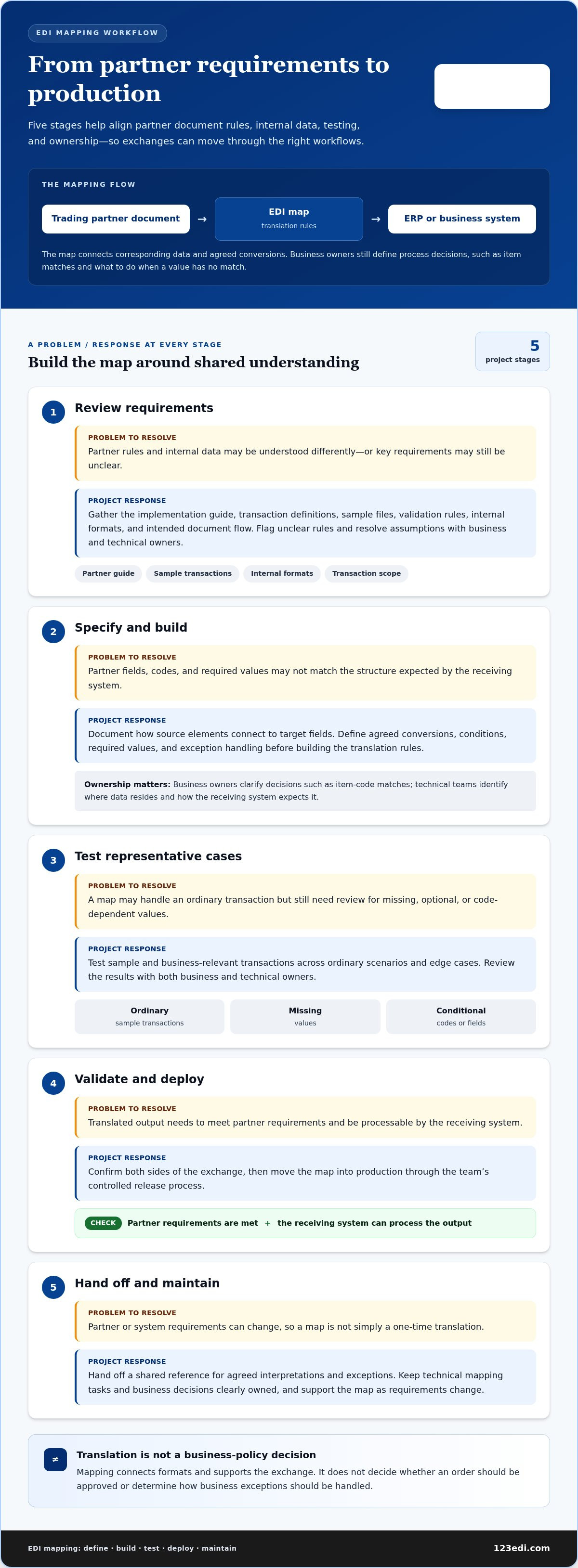
EDI mapping projects typically move through requirements review, development, testing, controlled deployment, and handoff. Each stage helps confirm both the translation and who is responsible for it.
- Review requirements: Gather partner guides, sample transactions, internal formats, and the intended document flow. Confirm the transaction scope and flag unclear rules.
- Specify and build: Document how source elements connect to target fields, including agreed conversions, conditions, and exception handling.
- Test representative cases: Use sample and business-relevant transactions to check ordinary scenarios as well as missing, optional, or code-dependent values. Review results with business and technical owners.
- Validate and deploy: Confirm that the translated output meets partner requirements and that the receiving system can process it. Move the map into production through the team’s controlled release process.
- Hand off and monitor: Document the map’s purpose, assumptions, known exceptions, and change ownership. Define who reviews transaction issues and coordinates updates when partner or system requirements change.
A compact rule might read: Source field: partner item code → Transformation: convert using the agreed item cross-reference → Target field: ERP item identifier. The conversion depends on a business-approved relationship between codes. The map applies that rule rather than deciding what the relationship should be.
Because a map is part of a broader operational flow, its handoff should connect technical documentation with ownership of business exceptions. Teams planning the system connection can also review this guide to EDI integration with ERP systems. 123 EDI’s EDI integration solutions bring cloud EDI and ERP integration into the same workflow.
EDI Mapping Service Models: Internal Teams, Tools, and Integration Support
Choosing an approach means deciding who owns map creation, testing, revisions, and day-to-day questions. The right arrangement depends on partner complexity, transaction volume, connected systems, and the time and expertise available internally. You can also combine models, for example by using mapping software while relying on integration support for parts of the workflow.
| Approach | Responsibility | Expertise and change handling | Fit with existing workflows |
|---|---|---|---|
| Internal development | Internal staff build, test, document, and maintain maps. | Requires EDI, data, and system knowledge. The team handles partner changes directly when it has capacity and clear ownership. | Can align closely with established processes, but business and IT teams need a shared way to prioritize and approve changes. |
| Software-led mapping | Staff use mapping tools to define and manage translation rules. | Software provides an environment for map creation, but people still need to understand requirements, validate results, and manage updates. | Works best when the tools and available expertise fit the systems and document flows already in use. |
| Supported integration services | Internal owners provide business context while integration specialists support technical implementation and coordination. | Responsibilities are shared. The division of work determines how changes are handled. | Can connect mapping decisions to partner exchanges and ERP workflows rather than treating a map as an isolated file. |
When an internal mapping team may fit
An internal team may suit an organization with established EDI expertise, consistent access to system knowledge, and enough capacity to support new partner flows and ongoing revisions. Keeping the work in-house can preserve close links to internal processes, but it makes documentation essential. Record map logic, test changes, and capture decisions so knowledge doesn’t remain with one employee. Without defined ownership, business teams may expect IT to resolve process questions, while IT may need business owners to interpret partner requirements.
How software and integration services complement each other
Mapping software gives staff tools to create and maintain rules. Integration services handle the surrounding work of connecting partner requirements, system formats, testing, and operational responsibilities. A tool may support map development, but it doesn’t decide who approves business exceptions or how an exchange fits an ERP workflow. Those questions shape practical fit, especially when partner processes and internal systems must work together. 123 EDI’s cloud-based EDI and ERP integration services support this broader coordination. For more on the cloud model, see this guide to cloud-based EDI solutions.
As you compare approaches, map responsibilities as carefully as technology: who defines the business rule, who configures it, who tests changes, and who responds when an exchange needs attention? Clear answers help teams choose an arrangement they can sustain as partners, transaction volumes, and systems evolve.
How to Prepare for EDI Mapping and Keep Maps Maintainable
Preparation gives everyone a shared picture of the exchange and reduces delays caused by missing files or unresolved questions. Before engaging EDI mapping services, assemble the partner’s requirements, internal system details, and contact information for people who can explain business rules. Start with this checklist:
- Partner documents: Gather the current implementation guide, transaction definitions, and partner-specific instructions for the documents in scope.
- Sample transactions: Collect representative examples, including different order or invoice scenarios and known exceptions. Note which examples are current and what each is meant to illustrate.
- Internal formats: Provide relevant ERP or system file definitions, field descriptions, code lists, and sample input or output files.
- Transaction scope: Identify the document types and directions involved, such as orders received from a partner or invoices sent to one. Separate current needs from possible future additions.
- People and ownership: Name the ERP owner, business reviewer, technical contact, and person responsible for exception decisions in each workflow.
- Known data issues: Record irregular, missing, or inconsistent values as observations. Don’t assume why they occur; have the appropriate business and technical owners assess them.
Gather the documents and data needed to start
Make sure the materials describe the same version of the workflow. If a partner guide has been updated, identify the instructions that apply. If sample files represent different situations, label them clearly. This context helps reviewers distinguish a genuine requirement from an unusual example and gives the mapping team a reliable basis for discussing conditional, unfamiliar, or inconsistently handled fields.
Bring business and technical reviewers into the conversation early. A business owner can clarify how an exception should be treated, while an ERP owner can explain where data is stored and how the receiving workflow uses it. Their input makes technical assumptions visible and helps prevent undocumented decisions from becoming part of the map.
Plan testing, updates, and operational ownership
Representative test data shows how a map handles real business variations before translated transactions enter production. Define who reviews test results, approves changes, and authorizes deployment. Keep the map specification, decisions, test outcomes, and version history in a shared location accessible to responsible teams. A concise change record should state what changed, why, and which transaction flow it affects.
Establish a repeatable way to assess partner updates, new transaction requirements, and changes to internal systems. Route each change to the relevant business and technical owners, then document its impact and approval before revising the map. This makes maintenance part of the operating process rather than an urgent task triggered only after an exchange is disrupted.
For coordinated EDI mapping and ERP integration, explore 123 EDI’s EDI integration solutions.
How 123 EDI Connects Mapping Needs with Cloud EDI and ERP Integration
A mapping plan is most useful when it reflects the full route a business document takes, from a trading partner’s system through EDI and into an ERP workflow, or in the reverse direction. 123 EDI offers cloud-based EDI, EDI software, portals, communications, AS2, and EDI integration with ERP systems. These services and products address the practical parts of an exchange: partner document transfer, the systems that send or receive data, and how those parts fit together.
Connect partner exchanges with ERP workflows
For an incoming transaction, mapping must account for the partner’s document requirements and the internal system’s expected data structure. For an outgoing document, the direction reverses: business-system data must be organized for the partner’s exchange. In either case, the ERP and partner workflow shape the requirements. Consider a map alongside the specific systems, transaction types, and partner instructions involved, rather than as a standalone technical task.
Communication architecture is another part of the picture. When planning how documents move between organizations, consider EDI communications and AS2 alongside mapping and ERP integration. The AS2 communication service overview provides context for this connection. The aim is to understand how document translation, communication, and internal processing fit together in the intended workflow, rather than assume one configuration suits every organization.
This broader view keeps EDI mapping services grounded in operational context: which partner sends or receives each document, where data originates or needs to go, and which teams own business decisions and system requirements. 123 EDI’s cloud EDI and ERP integration services support businesses planning these connected exchanges.
Move from mapping requirements to a practical next step
Bring the information you have gathered into a project discussion. A clear starting package can include:
- Partner implementation requirements and transaction definitions.
- Sample transactions that illustrate the documents and variations in scope.
- ERP or internal-system formats, relevant field definitions, and data owners.
- The transaction types, trading partners, and exchange directions to address.
- Known exceptions, business reviewers, technical contacts, and change approvers.
This preparation gives the discussion a concrete focus: how requirements connect to your systems and workflows, and where responsibilities need to be defined. Project scope can reflect that integration context, whether the priority is a partner exchange, an ERP-connected data flow, or a broader cloud EDI approach. Clear documentation also gives business and technical participants a shared basis for decisions and next steps.
To explore an approach aligned with your partner exchanges and internal systems, explore 123 EDI’s EDI solutions and discuss your EDI integration needs.
Shape Your Next EDI Flow with Confidence
Start with a focused review of one partner exchange: what information needs to move, which systems it touches, and who will own decisions as requirements change. This gives your team a practical basis for evaluating EDI mapping services and aligning the work with broader integration plans.
123 EDI brings cloud-based EDI, portals, communications, AS2, and ERP integration together to support partner-to-system data flows. With your requirements and priorities in hand, you can discuss an approach shaped around your business context.
Discuss your EDI integration needs with 123 EDI. A clear first step can help your team build data flows that are easier to understand and manage.
Frequently Asked Questions
Can one EDI map work for multiple trading partners?
Sometimes, if partners use compatible transaction requirements, structures, and business rules. A shared base or reusable mapping component may reduce duplicate work, but partner-specific codes, required fields, or interpretation rules can still call for adjustments. For example, two partners may use the same transaction type but expect different values in a particular field. Document those variations and validate the output against each partner’s requirements before reuse.
How often should an EDI map be reviewed?
Review a map when partner specifications, transaction requirements, internal system formats, or business processes change. The right cadence depends on how often those parts of your environment shift and on your operational controls, so no single schedule fits every organization. Assign an owner to track relevant changes, assess their effect on connected workflows, and ensure updates are reviewed and approved before production.
What happens if an EDI transaction contains a value the map does not recognize?
The outcome depends on the map’s rules and the receiving workflow: the value may be rejected, flagged for review, or routed through an exception process. For example, an unfamiliar shipping code could require a business owner to determine its meaning before the transaction proceeds. Document expected values and define who handles exceptions. Testing representative data can reveal how unrecognized values are treated before production.
Can EDI mapping connect a partner’s data to an ERP system?
Yes. Mapping can translate partner EDI data into a format an ERP system can use, while integration connects that data to the relevant business workflow. The implementation depends on the systems involved, transaction scope, and partner requirements. For example, an incoming purchase order and an outgoing invoice may involve different data paths and review needs. Include EDI mapping in the broader ERP integration plan.
How do teams test an EDI map before using it in production?
Teams test representative source transactions, compare translated output with documented requirements, and review exceptions with business and technical owners. Include meaningful variations, such as an order with optional fields or an invoice containing a less common item scenario, rather than relying only on an ideal example. Production readiness depends on the organization’s validation and approval process, including how reviewers record findings and authorize a release.
Do EDI mapping services also manage changes to partner requirements?
They can, depending on the project scope and operating model, so define responsibilities clearly. A useful change process records the partner’s revised requirement, identifies affected transactions and maps, and assigns owners to assess and test the update before deployment. This helps prevent a change from being treated as an isolated technical edit when it may also affect business decisions or ERP workflows. Clarify how change coordination fits within the EDI integration relationship.