

What if the biggest challenge in logistics EDI isn’t exchanging documents, but keeping every handoff connected? When orders, shipment notices, and carrier updates arrive through separate channels, teams may rekey information or chase status across trading partners. Cloud EDI for logistics gives businesses a hosted way to exchange structured data and connect those updates to operational workflows.
Connecting partners and business systems takes planning, especially when existing ERP workflows need to keep running. Start with the handoffs that matter most: identify who sends and receives each document, where the data originates, and which system or team needs it next. Then map the partner requirements and exception process before configuring the exchange.
This article explains where cloud EDI can support logistics operations, how documents such as purchase orders, advance ship notices, and shipment-status messages fit into the flow, and what to consider before implementation. You’ll also find practical ways to assess partner requirements, system integration, security, and rollout priorities. With experience in B2B data integration dating to circa 1994, 123 EDI offers cloud EDI and ERP integration to connect trading-partner exchange with business workflows.
Key Takeaways
- See how cloud EDI for logistics connects structured documents across shipment handoffs, from tender through delivery.
- Understand the roles of EDI 204, 214, and 210 in coordinating transportation orders, shipment updates, and freight invoices.
- Compare cloud and traditional EDI across hosting, access, integrations, and the operational responsibilities that remain.
- Use a workflow inventory of partners, documents, systems, and exceptions to define a practical first implementation.
- Explore how 123 EDI’s cloud EDI, communications, AS2, portal, and ERP integration services support connected workflows.
Cloud EDI for Logistics: What It Connects Across a Shipment
A shipment involves multiple companies, teams, and systems. Orders, pickup details, delivery updates, and invoices need to reach the people coordinating the work. Cloud EDI for logistics provides a hosted way to exchange and process standardized business documents between trading partners. It can connect those handoffs and reduce the need to treat each exchange as a separate manual task.
Cloud EDI combines two ideas. “Cloud” describes where the EDI service is delivered and managed; EDI describes the structured electronic exchange of business documents. A standard such as ANSI X12 or UN/EDIFACT defines rules for structuring information, while a transaction set identifies the type of document being exchanged. For a foundational overview, see Electronic Data Interchange (EDI).
Which logistics teams exchange data through cloud EDI?
Shipment information can move between internal operations and fulfillment teams and external shippers, carriers, warehouses, suppliers, and logistics service providers. Each participant needs different details at different points in the shipment. Map who creates each piece of information, who receives it, and what action follows to keep the exchange useful and consistent.
For example, fulfillment teams may need order and dispatch information, transportation teams may coordinate with a carrier, and finance may use shipment and billing details to reconcile charges. A third-party logistics provider may coordinate between a shipper and multiple carriers, making clear partner-to-partner document flows especially important.
What changes when logistics EDI is cloud-based?
With cloud EDI, exchange and processing take place through a hosted service rather than relying solely on infrastructure managed locally by the business. Depending on the workflow, teams and partners can exchange documents through connected systems or a portal. The setup depends on partner requirements, document flows, and the systems involved.
The hosting model changes where some technology runs, not who owns the business process. Teams still need to define document rules, manage partner relationships, review exceptions, and assign responsibility for the information being exchanged. Cloud delivery can reduce the need to administer EDI infrastructure locally, but it does not remove the need for operational oversight or integration planning.
For a broader look at the delivery model and its operational considerations, explore this comprehensive cloud-based EDI guide. In logistics, start by tracing a shipment’s handoffs and identifying which teams need each document and when. That view helps distinguish the business data flow from the particular standard, transaction, or hosting arrangement used to support it.
How Cloud EDI Moves Logistics Data from Tender to Delivery
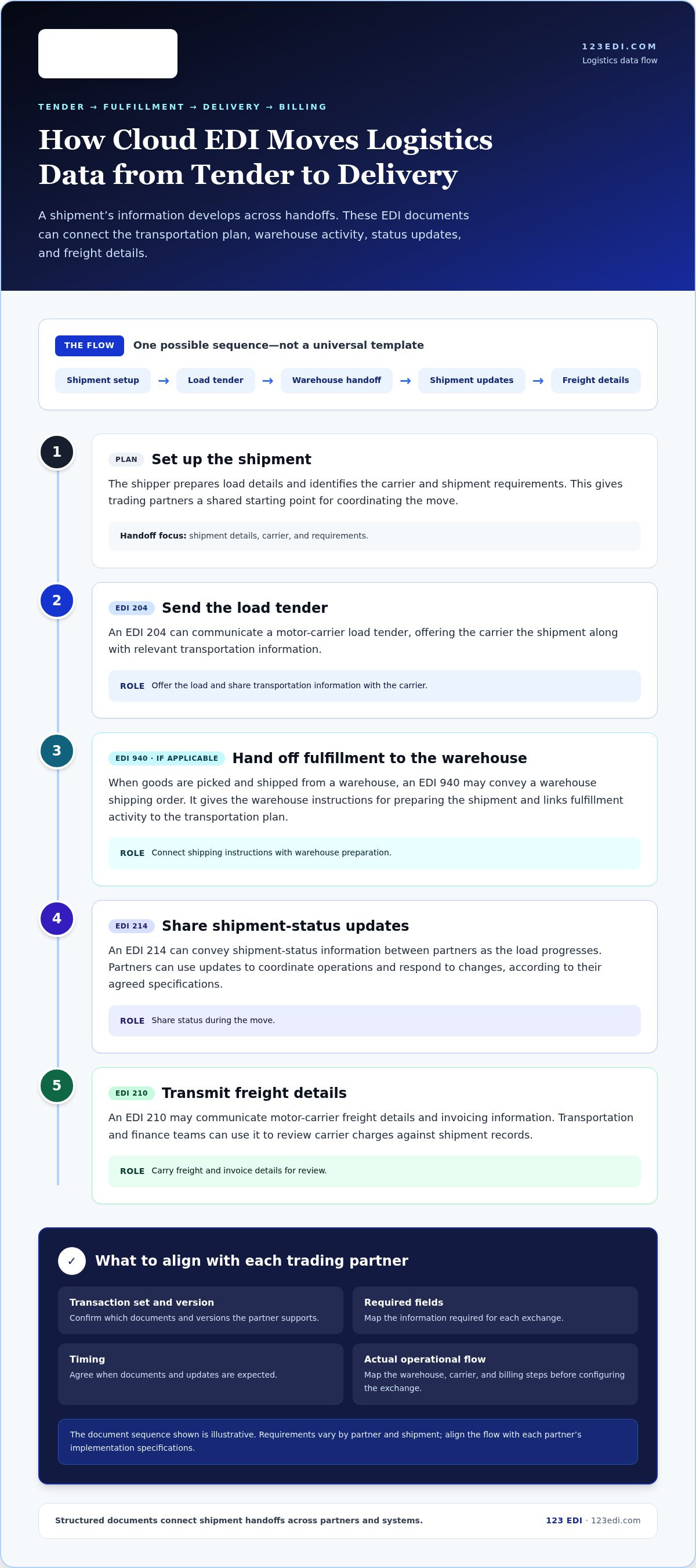
A shipment’s data develops as work moves from planning to pickup, fulfillment, transit, and billing. Cloud EDI can connect those handoffs by carrying structured documents between a shipper’s systems, a carrier, a warehouse, and other trading partners. The documents below illustrate one possible flow, not a universal template. Align transaction requirements and versions with each partner’s implementation specifications.
- Set up the shipment. A shipper prepares the load details and identifies the carrier and shipment requirements. These details give trading partners a shared starting point for coordinating the move.
- Send the load tender. An EDI 204 can communicate a motor-carrier load tender, offering the carrier the shipment and relevant transportation information. The carrier’s response and any additional documents depend on the partners’ agreed workflow.
- Hand off fulfillment to the warehouse. If goods are picked and shipped from a warehouse, an EDI 940 may convey a warehouse shipping order. The document gives the warehouse instructions for preparing the shipment and connects fulfillment activity to the transportation plan.
- Share shipment updates. An EDI 214 can convey shipment-status information between partners as the load progresses. Partners can use those updates to coordinate operations and respond to changes, based on the events and details in their specifications.
- Transmit freight details. An EDI 210 may communicate motor-carrier freight details and invoicing information. Finance and transportation teams can use it to review carrier charges against shipment records.
From load tender to shipment-status updates
The 204 and 214 support different points in the transportation handoff: the 204 offers a load to a motor carrier, while the 214 shares status information. Together, they can link the transportation plan with updates during the move. Requirements vary by trading-partner relationship, so align the transaction set, required fields, and timing with each partner’s implementation specifications.
From warehouse activity to freight documentation
The warehouse handoff connects shipping instructions with the physical work of preparing an order. In one illustrative flow, a 940 carries the shipping order to the warehouse, and a 210 later carries the carrier’s freight details and invoice. Not every shipment uses these same documents. Map the actual warehouse, carrier, and billing steps in your operation before configuring the exchange.
Linked EDI documents create a more coherent shipment record by connecting the plan, fulfillment instructions, transit updates, and freight charges. That connection is useful when documents reflect how partners actually work. For teams mapping these handoffs to connected systems, 123 EDI’s integration services connect trading-partner exchange with business workflows.
Cloud EDI vs. Traditional EDI: What Changes for Logistics Teams?
Moving EDI to the cloud changes how the service is hosted and accessed, not the purpose of the documents or the responsibilities behind them. With cloud EDI for logistics, a hosted service handles exchange and processing. A locally managed setup relies more directly on infrastructure administered within the organization. Neither model removes the need to align partner requirements, maintain dependable workflows, and assign ownership for each operational task.
Use this comparison to frame the decision. Actual arrangements vary by provider, integration design, and how your logistics operation is organized.
| Consideration | Cloud EDI | Traditional, locally managed EDI |
|---|---|---|
| Hosting | EDI services run in a hosted environment. | EDI infrastructure is managed locally by the organization. |
| Internal administration | Some infrastructure management may shift to the hosted service, while internal oversight remains. | Internal teams take a more direct role in maintaining the EDI environment. |
| Access | Users and partners access exchange through the service’s configured connection methods. | Access depends on the locally managed environment and its connections. |
| Integrations | Partner exchange can be connected with business systems, subject to integration requirements. | Integrations are managed within the organization’s EDI setup. |
| Operational responsibility | Hosting may be external, but teams still own partner rules, data quality, and exception processes. | Teams oversee those same processes and more of the supporting infrastructure. |
Where cloud EDI can simplify logistics operations
A hosted model can make access and partner communications easier to coordinate, particularly when exchange connects to existing business systems. Automating document movement may reduce manual handoffs, but it does not make every transaction error-free. Useful visibility depends on connected, timely data and defined workflows. Teams need to know which events are captured, where updates appear, and who acts when information needs attention.
What logistics teams still need to manage
Cloud delivery does not transfer ownership of the business process. Teams still need to coordinate partner onboarding, define which organization owns each data element, review exceptions, and assign responsibility for follow-up. Security controls and continuity planning also remain essential. Establish access expectations, escalation paths, and procedures for service interruptions rather than assuming the hosting model settles these questions.
Keep three decisions separate: the deployment model, whether cloud or locally managed; the transaction standards and implementation specifications each partner requires; and the software or integration provider. A cloud service still needs to support the agreed document flows, while a locally managed system can use the same standards. For ERP planning, consider how partner documents enter and leave existing workflows; this EDI integration with ERP guide explores that connection. The useful comparison is not simply where the software is hosted, but which arrangement fits your responsibilities, partner connections, and operating processes.
How to Put Cloud EDI to Work Across Logistics Operations
A successful rollout begins with the work your teams and trading partners already do, not with a long list of documents to automate. Treat cloud EDI for logistics as an operational project: map the handoffs, agree on requirements, test the data, and prepare the people who will manage the workflow. A defined scope keeps implementation practical and creates a basis for future connections.
Begin with a workflow inventory. For each candidate process, record:
- The trading partners involved, including carriers, warehouses, suppliers, and logistics service providers.
- The documents exchanged, their purpose, and when each is sent or received.
- The systems where information originates and where teams need it next, such as order, warehouse, transportation, or finance systems.
- The handoffs between teams and partners, plus recurring exceptions such as missing fields, rejected documents, or status mismatches.
Use the inventory to choose one manageable initial workflow. Prioritize a process with clear owners, understood partner requirements, and a defined way to judge whether the exchange is working as intended. Test and validate that workflow with the people who rely on it before expanding to more partners and document flows.
Prepare partner and system requirements
For each partner, document required transactions, formats, acknowledgments, timing expectations, and implementation specifications. Requirements can differ between relationships, so use each partner’s current documentation rather than assuming one setup applies across the network. Then trace how data moves through your systems: where order details are created, how warehouse instructions are generated, where transportation updates are used, and how finance receives the information it needs.
Assign roles early. Logistics operations can define real-world handoffs and exception priorities; IT can coordinate system access and integration; partner coordinators can manage specifications, testing communication, and changes. Name owners for ongoing monitoring, exception resolution, partner updates, and internal communication. Clear ownership means a rejected document has a defined next step instead of sitting between teams.
Test workflows and manage exceptions
Before production, map and validate data between the source system, EDI document, and receiving workflow. Test representative transactions with each trading partner, including expected acknowledgments and realistic variations in the data. Confirm that information reaches the right users and that teams know what to do if a transaction is rejected, required data is missing, or shipment statuses disagree.
Make exception procedures specific: identify who reviews the issue, how it is recorded, who contacts the partner, and how corrected information is resubmitted. During a pilot, capture questions and recurring problems, then refine mappings and operating instructions before adding partners or workflows. A measured approach makes implementation easier to manage without assuming automation eliminates oversight.
123 EDI connects cloud EDI with integration services, including ERP integration, to support trading-partner exchange alongside business workflows. The 123 EDI logistics EDI integration services can support planning around the partners, systems, and workflows your rollout needs to connect.
How 123 EDI Supports Cloud EDI for Logistics
Putting cloud EDI to work involves more than transmitting documents. The exchange needs to fit partner requirements and connect with the systems your teams use to coordinate orders, fulfillment, transportation, and finance. 123 EDI offers cloud-based EDI, software, a portal, communications, AS2, and EDI integration services, including integration with ERP systems. The right combination depends on the workflows and trading-partner connections your operation needs to support.
With experience in B2B data integration dating to circa 1994, 123 EDI connects standardized information exchanged with trading partners to internal business workflows. Planning around both sides of that connection helps keep integration grounded in existing systems and operational processes, rather than treating each document as an isolated technical task.
Connect trading-partner exchange with existing systems
EDI integration can link partner transactions with existing ERP workflows, helping information move between external exchanges and the business systems teams already use. Cloud EDI and EDI portal services support electronic partner exchange through different approaches, while EDI communications and AS2 address the communication layer. Choose the arrangement based on the connection and process requirements involved.
For organizations considering AS2 communications, the AS2 as a service overview explains how that option fits into EDI communication planning. Consider it alongside the broader workflow: which partners send or receive documents, where transactions enter your systems, and which teams use the resulting information. This keeps decisions about exchange, communications, and ERP integration grounded in operating needs.
Plan a logistics EDI conversation around workflows
A clear project discussion begins with a short inventory of the current state. Outline your partners, transaction flows, business systems, and operational priorities. Include handoffs that cause repeated manual work, the data each team needs, and any partner specifications that shape document exchange. Identify who will coordinate partner communication, review exceptions, and own the process after implementation.
From there, professional integration services can connect EDI with business systems and align the exchange with the workflow you’ve described. Useful planning questions include:
- Which partner relationships and logistics workflows should the initial scope cover?
- Where does the required data originate, and which ERP or other business system needs to receive it?
- What transaction, format, and acknowledgment requirements does each trading partner specify?
- How will teams handle exceptions and communicate changes to partner connections?
Answers to these questions give the project a practical starting point and help clarify which cloud EDI and integration components fit the work. A plan based on your partners, systems, and priorities can shape a considered path forward.
Make Your Next Logistics Handoff Easier to Manage
The most useful next step is not to connect every partner at once. Choose one handoff where teams spend time reconciling information or chasing updates, then define what a dependable exchange should look like: who sends the data, which system uses it, and who responds when something needs attention.
That starting point gives your team a practical way to assess cloud EDI for logistics against real operating needs. From there, you can shape the initial workflow, learn from partner testing, and decide how to extend the approach without losing sight of daily responsibilities.
123 EDI offers cloud EDI and integration services to connect partner exchange with business workflows. Discuss your logistics EDI workflows with 123 EDI to plan a more connected supply chain process.
Frequently Asked Questions
Is cloud EDI suitable for a small logistics operation?
Yes. Cloud EDI can suit a small operation that exchanges structured documents with trading partners but prefers not to manage all EDI infrastructure locally. A team coordinating regular carrier and warehouse relationships can map its document flows and recurring exceptions before deciding. Consider partner requirements, transaction volume, internal systems, available operational support, and expected growth to determine whether cloud EDI for logistics fits your needs.
Can cloud EDI connect with a legacy transportation or warehouse system?
Yes, cloud EDI can connect with existing systems, though the approach depends on available interfaces, data formats, and workflow needs. Trace a representative record, such as a shipment reference and its related quantities, from the system where it originates to the team or application that uses it. Identify how missing or differently formatted values should be handled, then test realistic transactions before expanding the connection.
How does cloud EDI handle different formats used by logistics trading partners?
Cloud EDI integrations can map partner documents to the data structure used by your business systems. A partner may specify particular codes, required fields, or acknowledgment expectations, even when documents follow the same broad EDI standard. Keep a versioned record of each partner’s implementation requirements and test changes against that record. This helps distinguish a formatting issue from missing business information or a partner-specific rule.
What happens if a cloud EDI connection is interrupted?
The effect depends on the service design and the continuity procedures your organization has established. Define how staff will spot delayed or failed exchanges, determine which transactions remain unresolved, and communicate with affected partners. Include duplicate prevention in reconciliation procedures, since teams need to know whether a transaction was received before resending it. Assign an owner for investigation and document the steps for resuming normal exchange.
Can cloud EDI work alongside APIs in a logistics environment?
Yes, an operation can use EDI and APIs for different connections. For example, a business might use EDI for a partner’s structured shipping documents while an API supports an application-to-application exchange elsewhere in its workflow. Choose the method based on each partner’s capabilities, system interfaces, and the information being exchanged. Document the purpose and owner of every connection to avoid duplicate processes or unclear sources of data.
Does a cloud EDI portal replace system-to-system EDI?
Not necessarily. A portal can support user-led exchange or review, while system-to-system EDI moves documents between connected applications. A business might use a portal for a partner relationship that requires staff interaction and automated connections for transactions that flow directly between systems. Before deciding, identify who enters, reviews, and acts on each document, and establish which system is the authoritative record for that information.