

How many hours did your team spend last week manually re-keying purchase orders into your accounting software, only to find that a single typo triggered a costly retailer chargeback? It is a frustrating reality for many growing suppliers who feel caught between the excitement of a new contract and the administrative weight of manual labor. You aren’t alone if you’re looking for a way to integrate EDI with QuickBooks to escape the confusion of AS2 protocols and X12 standards. We’ve helped many partners move past these technical hurdles to find a more stable, reliable way of doing business.
The good news is that you can turn this complexity into a streamlined advantage. This 2026 guide shows you the exact steps to build a seamless, automated workflow that grows with your business without adding headcount. We’ll walk you through the transition from manual entry to 100% compliance, ensuring your Advance Ship Notices and invoices meet every trading partner’s strict standards. By following this roadmap, you’ll gain the clarity needed to transform your QuickBooks environment into a proactive, high-speed hub for your entire supply chain.
Key Takeaways
- Identify how to transition from the manual entry trap toward a system that automatically synchronizes your purchase orders and invoices.
- Compare the benefits of cloud-based EDI portals and direct software integration to find the most efficient fit for your order volume.
- Follow a clear roadmap to integrate EDI with QuickBooks, covering everything from trading partner discovery to accurate data mapping.
- Master the automation of Advance Ship Notices to ensure 100% compliance with retail partners and avoid costly chargebacks.
- Gain insight into how professional onboarding and expert consulting provide a steady hand during complex technical transitions.
Overcoming QuickBooks EDI Limitations: From Manual Entry to Automation
QuickBooks is a trusted cornerstone for small to medium businesses, providing a clear window into financial health. However, as your business grows and you secure contracts with major retailers, you’ll quickly find that QuickBooks wasn’t built to speak the technical language of the global supply chain. When you choose to integrate EDI with QuickBooks, you’re doing more than just moving data. You’re creating a vital translation layer between your ledger and the complex standards of X12 or EDIFACT. Without this automation, many suppliers find themselves stuck in the manual entry trap, where human error becomes an expensive daily risk.
Rekeying purchase orders from a retailer’s portal into your accounting environment is a high-risk activity. It isn’t just about the time wasted; it’s about the precision required to avoid fatal shipping errors. A single mistyped quantity or a transposed item number can trigger a cascade of issues. When you integrate EDI with QuickBooks, you effectively transform your accounting software from a simple record-keeper into a proactive supply chain hub. Without this link, the first sign of trouble often isn’t a software alert, but a deduction on a settlement check. These chargebacks are the financial cost of non-compliance, and they can quickly erode the profitability of a major contract.
Why QuickBooks Requires a Third-Party EDI Solution
At its heart, QuickBooks is designed for ledger management and financial reporting. It lacks the built-in architecture to handle EDI translation or secure communication protocols like AS2 and SFTP. To bridge this gap, you need a specialized solution that acts as a mentor between two different worlds. This software takes the encrypted, raw data sent by your trading partners and converts it into a format that QuickBooks naturally understands, such as a Sales Order or an Invoice. This ensures that your accounting records remain the source of truth without requiring your staff to learn the intricacies of EDI coding. When evaluating your options, reviewing a comprehensive comparison of edi software solutions for 2026 can help you identify the right fit for your specific accounting environment.
Identifying the Breaking Point in Your Operations
Many businesses reach a plateau where manual processing becomes a barrier to scaling. If your team is spending more than an hour a day on data entry, or if you’re struggling to send Advance Ship Notices (ASNs) within the retailer’s required window, you’ve reached the breaking point. It’s helpful to calculate the true labor cost of these manual tasks. Often, the investment in automation is far lower than the cost of human error and lost productivity. Moving toward a more robust system is a natural evolution, much like the broader EDI integration with ERP strategies used by larger enterprises. Recognizing this need early allows you to build a foundation for sustainable, stress-free growth.
Evaluating Your QuickBooks EDI Integration Paths: Portal vs. Direct Sync
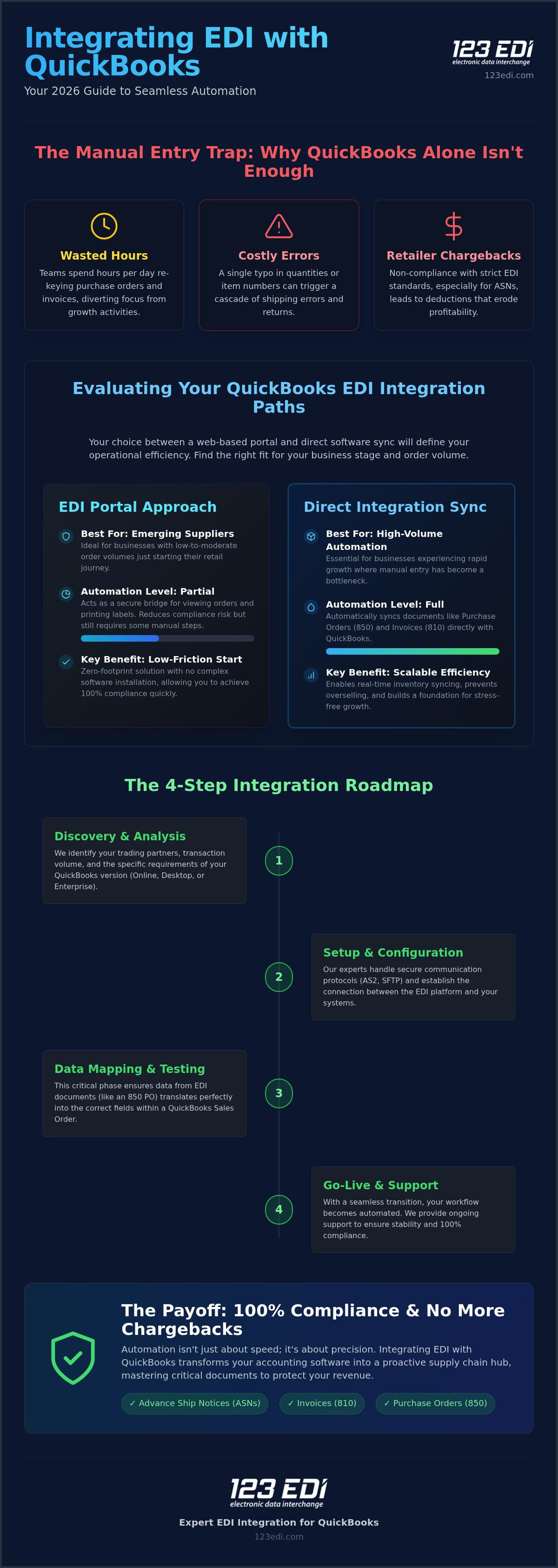
Deciding how to integrate EDI with QuickBooks requires a clear understanding of your business trajectory. While many providers promise a “one-click” fix, the reality is that your choice between a web-based portal and a direct software sync will define your operational efficiency for years. QuickBooks Online users often face different API constraints compared to those using Desktop or Enterprise versions, which offer more localized control but require specialized connectors. Your specific trading partner mandates, whether they come from a big-box retailer or a specialized distributor, will ultimately dictate which technical path provides the most stability.
The EDI Portal Approach for Emerging Suppliers
For suppliers just beginning their retail journey, a cloud-based EDI Portal offers a low-friction entry point. This zero-footprint solution doesn’t require complex software installations on your local machines. Instead, it acts as a secure bridge where you can view orders and print labels while the portal handles the heavy lifting of EDI translation. It’s a sensible choice when your order volume is manageable, allowing you to maintain 100% compliance without a significant upfront investment. As your order frequency increases, you can transition toward a more automated system without disrupting your existing relationships.
Direct Integration for High-Volume Automation
When your business experiences rapid growth, manual portal entries eventually become a bottleneck. Direct integration automates the flow of critical documents, such as the 850 Purchase Order and the 810 Invoice, directly into your QuickBooks environment. This path enables real-time inventory syncing, which is vital for preventing overselling across multiple channels. For those planning to scale beyond QuickBooks, exploring NetSuite EDI integration can provide a roadmap for future mid-market upgrades. This level of automation ensures your team stays focused on strategy rather than data entry.
Secure Communication: AS2 and Beyond
Retail giants like Walmart and Amazon often require AS2 (Applicability Statement 2) protocols to ensure data security. This method creates a direct, encrypted point-to-point connection that protects your business information during the interchange process. Unlike older methods, AS2 provides immediate receipts that confirm your partner received the data intact. Maintaining this level of security is essential for preserving the integrity of your B2B file transfers. If you’re unsure which protocol your partners require, it’s often best to consult with an EDI expert who can review your specific compliance documents and offer a clear path forward.
Step-by-Step: The EDI Integration Process for QuickBooks Users
When you decide to integrate EDI with QuickBooks, you’re initiating a five-stage transformation of your supply chain. This process moves beyond simple software installation. It requires a methodical alignment of your internal accounting logic with the external requirements of your trading partners. A successful implementation follows a clear, disciplined roadmap:
- Step 1: Trading Partner Discovery. We gather the specific Implementation Guides (IGs) from your retailers to understand their unique data requirements.
- Step 2: Data Mapping. This is the technical core where we link your QuickBooks fields to the specific segments in an EDI document.
- Step 3: Connectivity Setup. We establish the secure “digital handshake” using AS2, SFTP, or a Value-Added Network (VAN) to ensure safe data travel.
- Step 4: Retailer Certification. Your partners require a series of successful tests in a sandbox environment before they allow live production data.
- Step 5: Go-Live and Monitoring. Once certified, we move to production and closely monitor the first few document interchanges to ensure 100% accuracy.
Mastering Data Mapping and Translation
Data mapping is the process of ensuring that when a retailer sends a UPC, your system recognizes it as the correct QuickBooks SKU. This translation layer also handles complex details like ship-to codes, tax identifiers, and unit-of-measure conversions. Whether you are focusing on your current accounting setup or exploring the complexities of integrating EDI with SAP Business One, the logic remains the same. You need a precise map to prevent data from being “lost in translation.” Expert guidance is particularly helpful here to ensure that custom fields in QuickBooks are correctly represented in the EDI 810 or 856 segments.
Navigating the Retailer Certification Phase
The certification phase is often where unguided implementations stall. Retailers like Target or Walmart won’t accept live orders until you prove your system can perfectly handle 850 Purchase Orders, 856 Advance Ship Notices, and 810 Invoices. You’ll work within a “Sandbox” environment to simulate these transactions. A common pitfall is failing to account for specific shipping label requirements or timing windows for ASNs. We act as your mentor during this phase, helping you interpret error logs and adjust your configurations. Securing that “Ready for Production” sign-off is a major milestone that signals your business is ready for high-volume retail success.
Avoiding Chargebacks: Critical Compliance Features for QuickBooks
Chargebacks are more than just a nuisance; they are a direct hit to your bottom line that often stems from data timing issues. When you integrate EDI with QuickBooks, you move from a reactive posture to a proactive one. Retailers like Target or Costco operate on razor-thin schedules. They require your digital data to arrive well before the physical shipment reaches their receiving dock. If the data is late, missing, or inaccurate, the retailer’s automated system automatically triggers a deduction from your next payment. These penalties aren’t just one-time fees; they can signal to a partner that your business isn’t ready for high-volume growth.
The Power of the Automated ASN (EDI 856)
The Advance Ship Notice (ASN), or EDI 856, is perhaps the most critical document for retail compliance. It tells the retailer exactly what is on the truck, down to the specific carton and pallet level. By automating this process, your system pulls data directly from your QuickBooks shipping workflows to generate the ASN. This ensures the digital packing slip is accurate and, crucially, arrives on time. For those using QuickBooks Enterprise, this automation leverages advanced shipping features to link tracking numbers and GS1-128 labels directly to the EDI transmission. This level of synchronization is what allows you to scale without the fear of administrative penalties.
Error Handling and Exception Management
Even with the best automation, technical hiccups can occur. The difference between a minor delay and a major chargeback often lies in how you handle exceptions. A robust integration includes a system for monitoring 997 Functional Acknowledgments. These are the digital receipts that confirm your trading partner successfully received and “read” your transmission. If a document fails, you need immediate alerts rather than discovering the issue weeks later. Effective error management allows your team to correct a data mismatch or a communication failure without having to re-enter the entire order, maintaining the integrity of your supply chain.
Beyond just preventing errors, a managed integration provides a complete audit trail. This history is your best defense if a retailer issues an unfair chargeback. Having a searchable record of every transmission and acknowledgment allows you to resolve disputes with confidence. If you’re tired of seeing deductions on your settlement checks, it’s time to explore automated compliance solutions that protect your margins and simplify your daily operations.
Scaling Your Business with 123 EDI’s QuickBooks Integration Solutions
Since 1994, our team has served as a steady hand for businesses navigating the intricate world of retail compliance. When you choose to integrate EDI with QuickBooks through our platform, you’re gaining more than just a software license. You’re entering into a collaborative partnership with industry veterans who understand that technology is only as good as the support behind it. We take pride in simplifying the technical landscape, allowing you to focus on your core business while we handle the complexities of data management and retailer mandates.
Our approach centers on providing a stabilizing force for your operations. By utilizing our cloud-based EDI solutions, you can ensure that your accounting environment is always in sync with your trading partners. This foundation is designed to grow alongside you, whether you’re managing a few dozen orders or preparing for a national rollout. We provide the institutional knowledge necessary to turn a complex requirement into a routine, automated process.
A Collaborative Partnership for Long-Term Success
We believe in the power of mentor-style consulting. Our US-based team doesn’t just set up a connection and walk away. We provide dedicated integration support that guides you through every new retailer mandate and technical update. This human-to-human connection is what separates a successful implementation from a frustrating technical hurdle. For example, we’ve helped partners scale from processing 10 orders a day to over 1,000 orders per day without them needing to hire additional administrative staff. This level of scalability is only possible when your integration is handled with precision and comprehensive oversight.
Next Steps: Getting Started with QuickBooks EDI
Building a roadmap for your first retail integration starts with a clear understanding of your current workflow. We invite you to request a technical assessment where our experts can review your QuickBooks setup and trading partner requirements. This initial dialogue allows us to identify the most efficient path to integrate EDI with QuickBooks for your specific needs. From there, we provide a tailored demonstration of our portal and software solutions. Our goal is to ensure you feel confident and prepared as you move toward a more automated, compliant, and stress-free future.
Empowering Your Supply Chain for 2026 and Beyond
Transitioning your operations away from the manual entry trap is a significant step toward long-term stability and professional growth. By choosing to integrate EDI with QuickBooks, you’re doing more than just installing a technical connector; you’re building a foundation for scalable success that eliminates the persistent stress of retail chargebacks. We’ve explored how automated Advance Ship Notices and precise data mapping can transform your daily workflow from a reactive struggle into a proactive, 100% compliant hub.
With more than 30 years of EDI integration expertise, 123 EDI provides the seasoned reliability you need to navigate complex AS2 communications and evolving retailer mandates. We offer seamless transition paths that ensure your business remains agile and efficient as your order volumes increase. Our team is dedicated to being the steady hand that simplifies your data management journey. Contact 123 EDI today for a professional QuickBooks integration consultation.
Your journey toward a more efficient, automated future starts with a single collaborative step. We’re here to assist you in turning these technical challenges into a lasting competitive advantage. Let’s build a more reliable roadmap for your business together.
Frequently Asked Questions
Can I integrate EDI with QuickBooks Online?
Yes, you can. QuickBooks Online uses an API-based connection to sync with external systems. While it faces different architectural constraints than desktop versions, a cloud-based EDI portal or specialized software can bridge this gap effectively. This allows you to integrate EDI with QuickBooks Online to automate order and invoice processing. It’s an excellent choice for emerging suppliers who need a low-friction entry point into national retail compliance.
What are the most common EDI documents used with QuickBooks?
The most frequent transactions include the 850 Purchase Order, 810 Invoice, and 856 Advance Ship Notice (ASN). Additionally, the 855 Purchase Order Acknowledgment and 997 Functional Acknowledgment are vital for maintaining communication integrity. These documents ensure that your accounting system stays in sync with your retailer’s requirements. Automating these flows helps prevent the manual entry errors that often lead to the costly retailer chargebacks discussed earlier in this guide.
How long does a typical QuickBooks EDI integration take to go live?
A standard implementation usually takes between three to six weeks to reach the production phase. This timeline depends on the responsiveness of your trading partner and the complexity of your data mapping requirements. The process involves discovery, connectivity setup, and a mandatory testing phase in the retailer’s sandbox environment. Having a mentor-style consultant helps you navigate these technical hurdles more efficiently to ensure a smooth and timely go-live.
Is QuickBooks Enterprise better for EDI than QuickBooks Pro?
QuickBooks Enterprise is generally superior for EDI because it offers more robust inventory management and advanced shipping features. While you can integrate EDI with QuickBooks Pro or Premier, Enterprise provides the granular control needed for complex 856 Advance Ship Notices. It handles larger data volumes more effectively. This makes it the preferred choice for high-growth suppliers who need to maintain 100% compliance with national retail chains and distributors.
Will I need to change my SKU structure for EDI compliance?
You typically don’t need to change your internal SKU structure, as data mapping handles the translation layer. The integration software acts as a bridge, connecting your internal QuickBooks SKUs to the retailer’s UPCs or Global Trade Item Numbers. This allows you to maintain your existing accounting logic while meeting the specific formatting demands of your trading partners. Expert support is helpful here to ensure these cross-references are accurate from day one.
What is an EDI VAN and do I need one for QuickBooks?
A Value-Added Network (VAN) is a secure, private network that acts like a digital post office for EDI transactions. While many modern retailers prefer direct AS2 connections, some still require a VAN for document interchange. Whether you need one depends entirely on your trading partner’s specific mandates. We provide support for both AS2 and VAN communications, ensuring your QuickBooks environment remains connected regardless of the communication protocol required by your various retail partners.
How much does it cost to automate EDI with QuickBooks?
Costs vary based on your order volume, the number of trading partners, and whether you choose a portal or direct software sync. While we don’t quote fixed prices without a technical assessment, the investment typically includes a setup fee and an ongoing subscription. It’s helpful to view this as a strategic investment in scalability. Automating these processes often costs significantly less than the cumulative labor expenses and chargebacks associated with manual entry. Before committing to a platform, consulting a detailed guide to top edi software solutions for 2026 can help you benchmark your options and make a more informed purchasing decision.